此页面目前仅提供英文版本。
Version 5.1 - January 27, 2014
January 27, 2014
Finished
On January 28, 2014 the new version 5.1 is released. Download
Update: Version 4 and 5
Your current license will work with all 4.x ánd 5.x versions.
All existing 4.x customers will get 5.x free of charge. You can use the same license details.
New features and improvements
- Range » Advanced sorting...
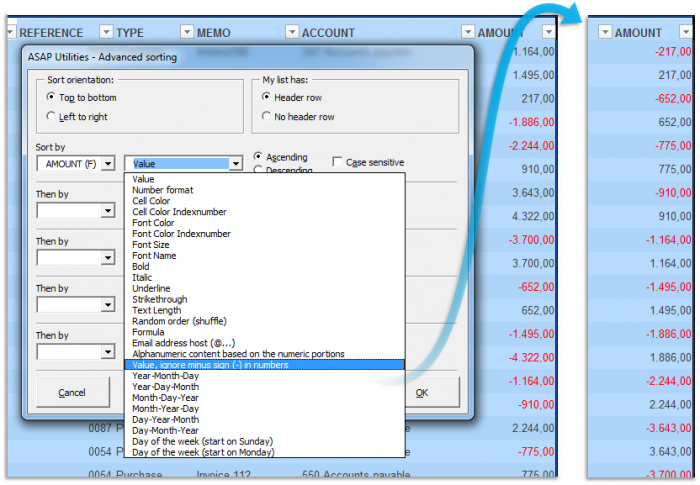
We've added a new sort option: "Value, ignore minus sign (-) in numbers"
This will sort your numbers ignoring the negative sign.
Positives and negatives are sorted as the same, which can be helpful for reconciliation (accounting).
For example this allows you to sort your amounts like this:
-668.00
668.00
-995.00
995.00
-1187.00
1187.00
1657,00
-1741.00
1741.00%20in%20numbers%20example%20with%20result%20-%20500px.png "Sort your numbers ignoring the negative sign - Click to enlarge")
- Range » Advanced sorting...
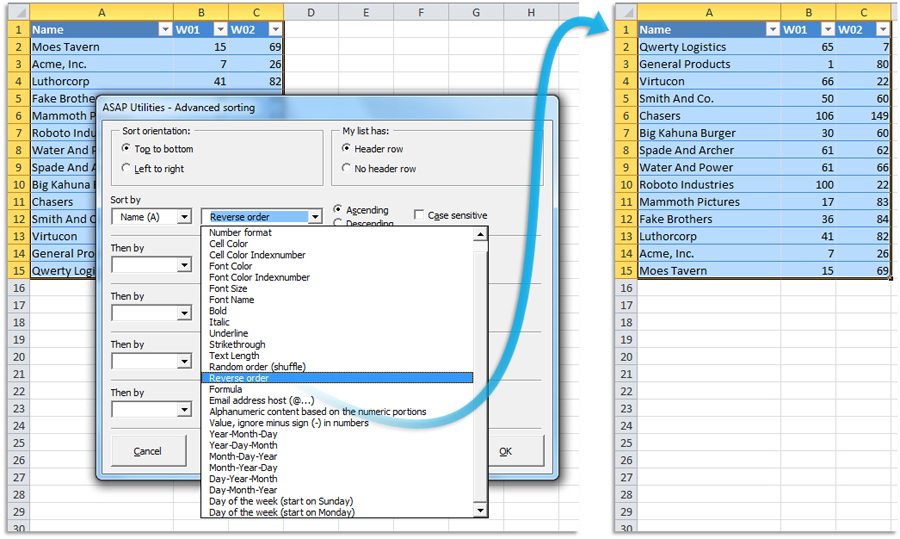
We've added a new sort option: "Reverse order"
This will reverse the order of the data, independent of the values in the cells.
You can use it to flip entire rows vertically or columns horizontally.
This can be helpful in for example the following scenario:
I've a long column of numbers in excel which I need to flip around or invert. I can't use Excel's sort function as it only sorts it in ascending or descending order but I need to reverse the order of the numbers
so that bottom becomes top and top becomes bottom for example.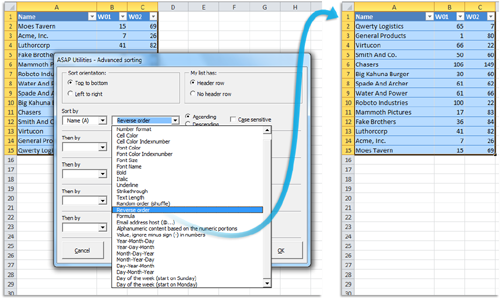
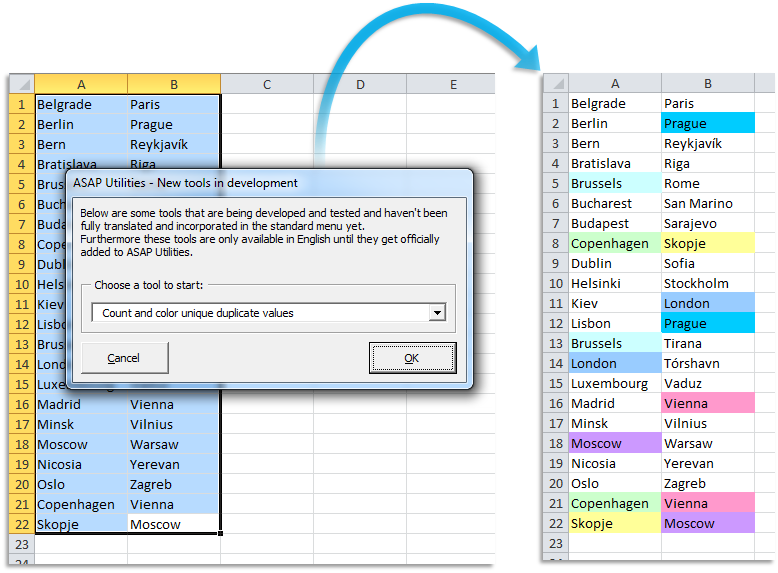
- NEW: Count and color unique duplicate values
via ASAP Utilities Options » New tools in development (English only)
Count and color the duplicate values in your selection where each set of duplications gets its own color.
(As long as there are enough distinct colors available to see the difference. If there are too many sets of duplicates then you will be notified).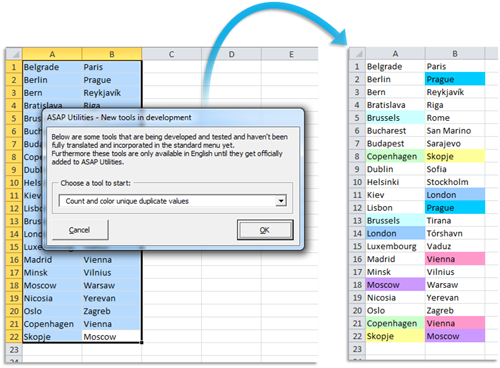
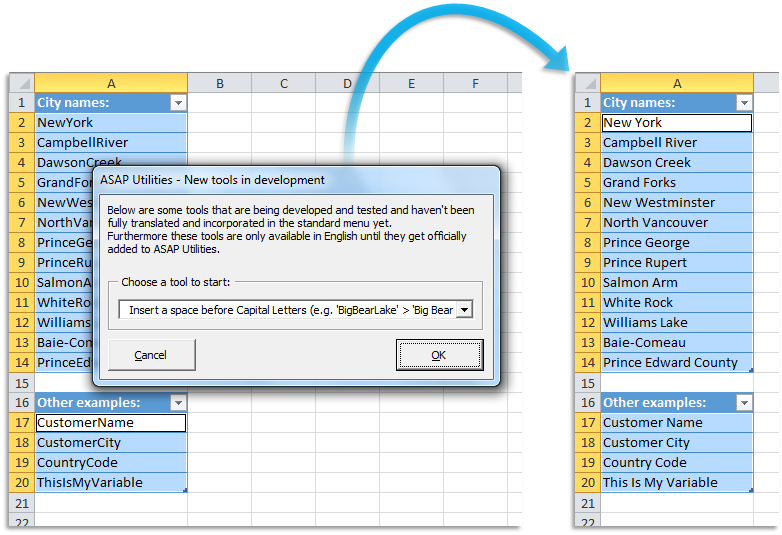
- NEW: Insert a space before Capital Letters (e.g. 'BigBearLake' > 'Big Bear Lake')
via ASAP Utilities Options » New tools in development (English only)
This will put a space in front of Capital letters in the text in your selected cells.
For example "NewYork" becomes "New York".
This tool is smart enough to detect when a space should be inserted and when not.
A space is only inserted before uppercase characters when it is not already preceded by a space and also when it is not preceded by any of the following characters: - " ' ( | = ` [ { < “ ‘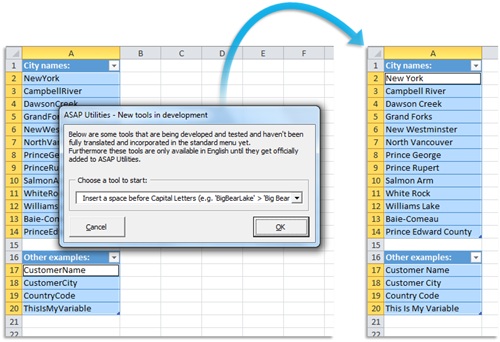
- Import » Merge and/or import multiple files...
New option to choose if the data should be copied/pasted as 'values' or 'formulas'.
If you choose 'formulas' then any formulas will be copied as they are, just like a regular 'copy and paste'. This has been how it always was in this tool, before you could make this choice.
If you choose 'values' then the values will be used from your source data, similar to Copy > Paste special > Values
New option to choose if you create a new worksheet for each file: 'Import page and print settings'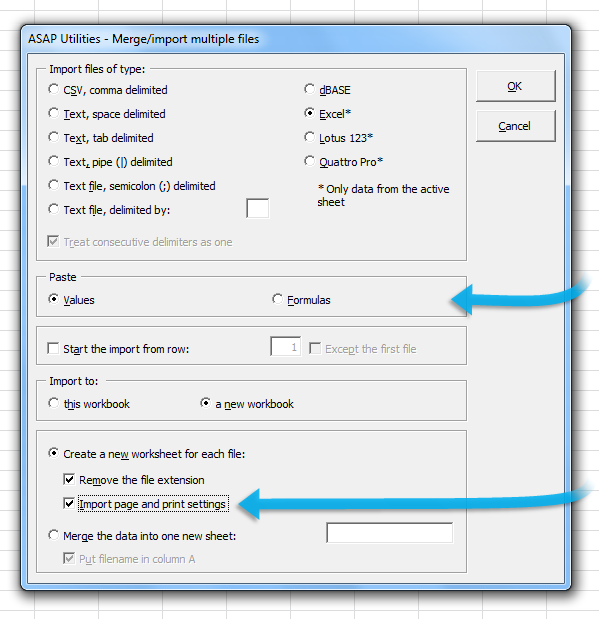
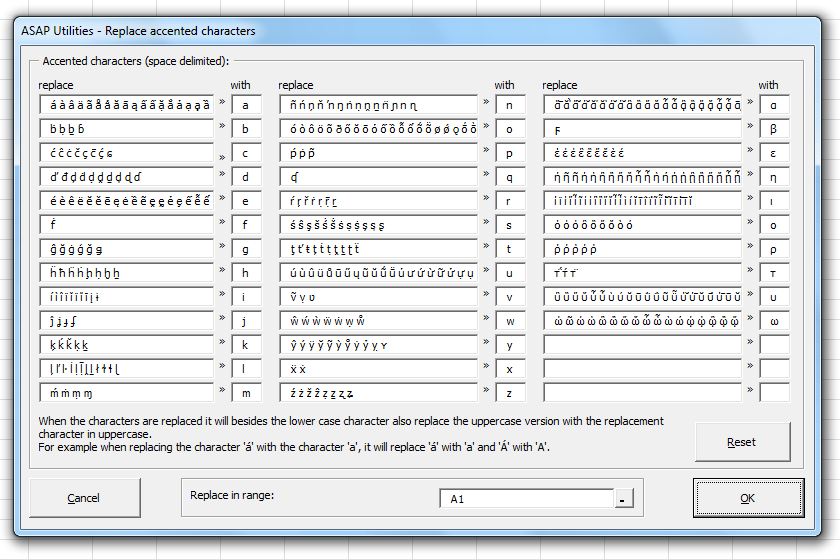
- Text » Replace accented characters (á, ë, ñ etc.)...
Greek accented characters have been added.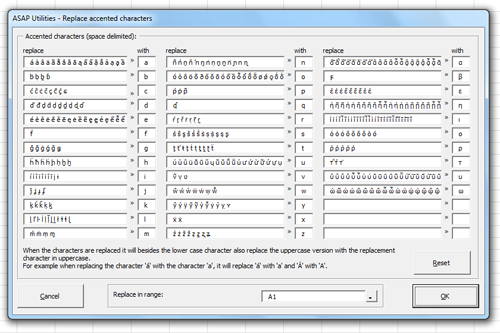
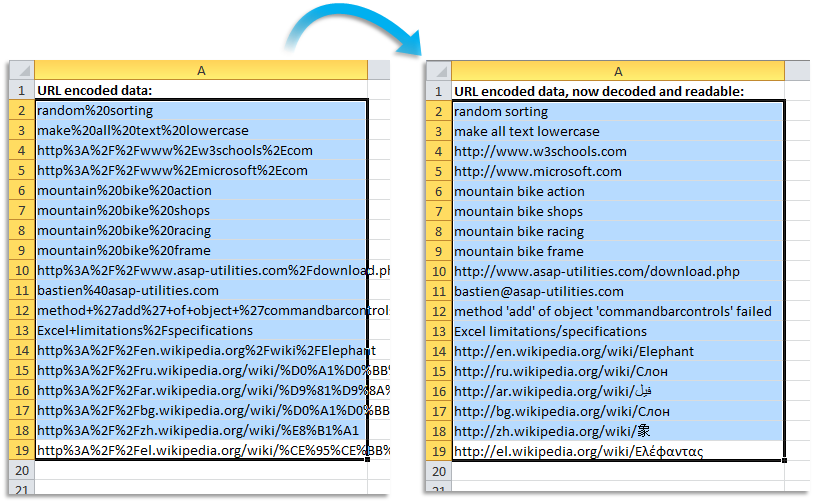
- Web » Decode all URL and HTML encoded text
Now also supports (all) Unicode characters (except when you run Excel in Windows 2000).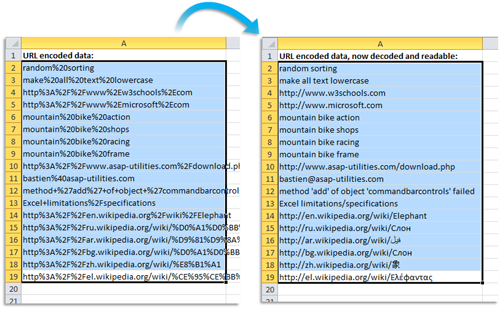
- Setup, Trusted Publishers
During the setup you can now have our company (A Must in Every Office BV) automatically added to the List of Trusted Publishers in Excel.
Some people have their security settings set to only allow macros run by Trusted Publishers, and then this can help.
For reference, Microsoft: Add, remove, or view a trusted publisher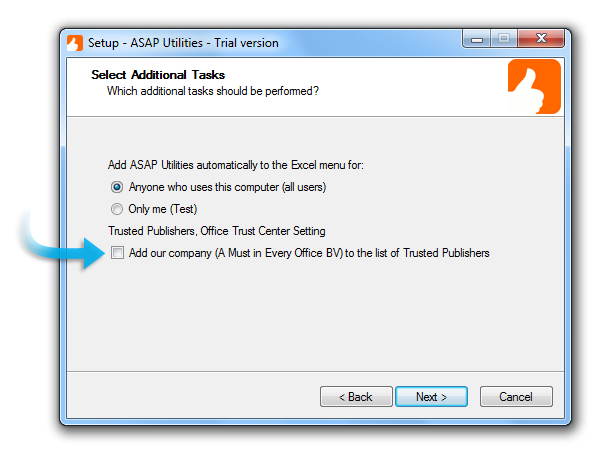
-
Customization, add tools to the Ribbon
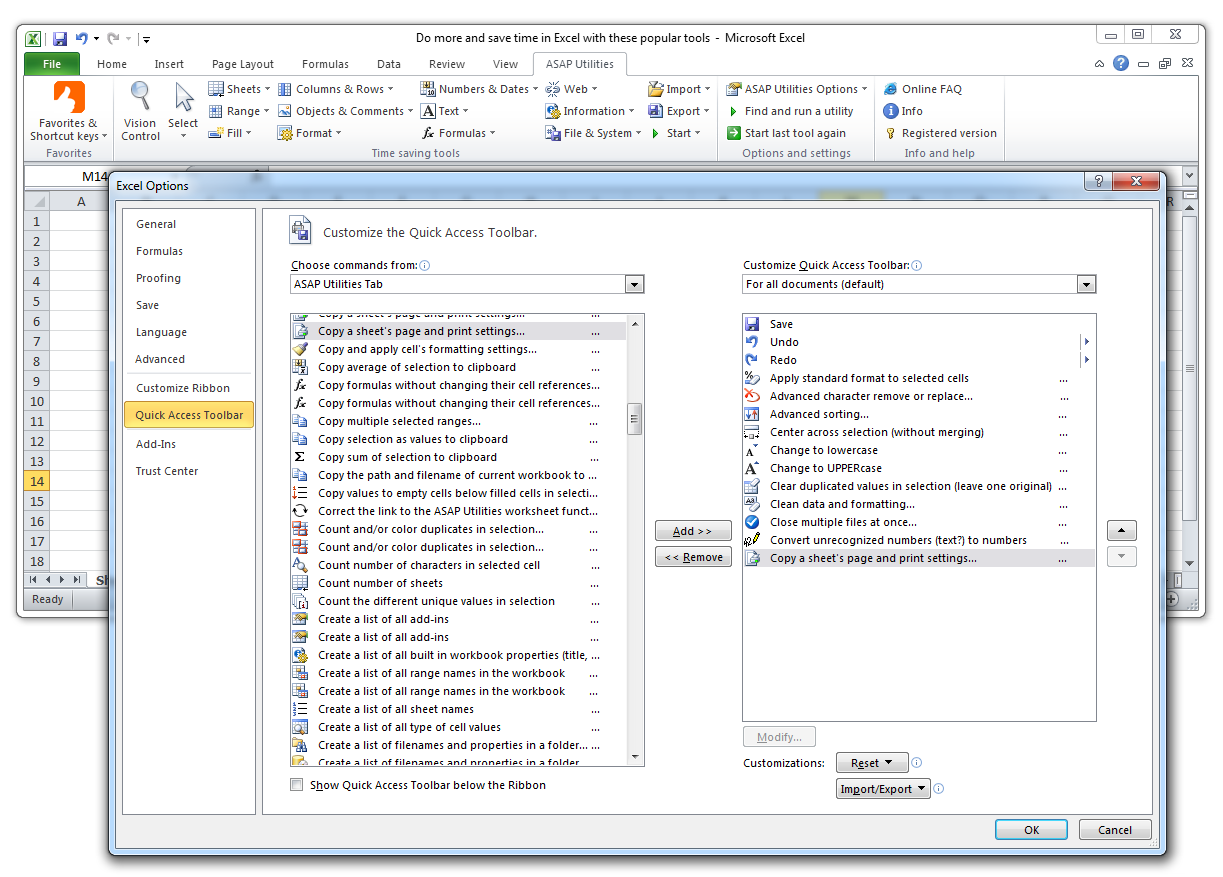
The tools from ASAP Utilities are now easier to add to the QAT (Quick Access Toolbar) from Excel 2013/2010/2007. Besides the existing way to add them to your favorites menu, we think that this might help to even further speed up your workflow.
You can do on two ways
#Method 1 By right-clicking on a tool in the menu and then choosing "Add to Quick Access Toolbar":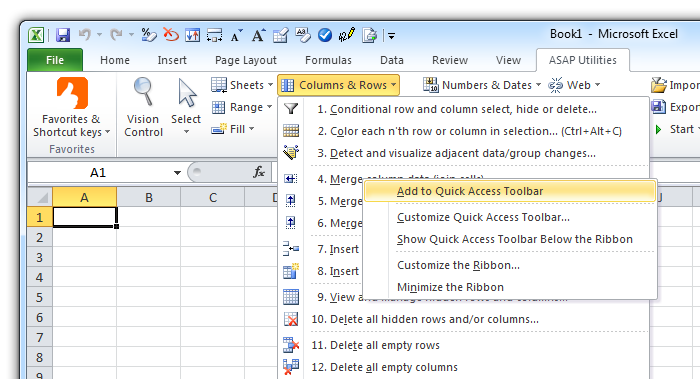
#Method 2 via File > Options > Quick Access Toolbar (only in Excel 2010/2013):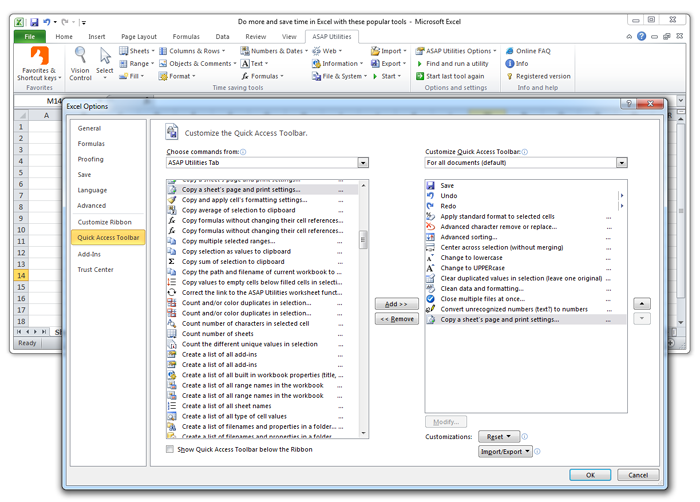
-
General
A few small improvements and a few spelling corrections.
Bug fixes and improvements
- Export » Export worksheets as separate files...
The combination of a filtered table and excluding hidden rows/columns from the export could result in an error. This is now fixed. - Sheets » Change name of selected sheets to selected cell's value
Didn't work if the specified cell on the sheet was hidden. This is now fixed. - Formulas » Change formula reference style (e.g. A1 to $A1 etc.)...
Formulas that referenced to a cell with an error were skipped. Such formulas are now updated too. - Range » Find and/or replace in all sheets...
The combination of "Find/replace in: Range" and "Look in: Formulas", didn't replace anything. This is now fixed. - Formulas » Change formula reference style (e.g. A1 to $A1 etc.)...
Formulas that referenced to a cell with an error or resulted in an error were skipped.
These formulas are now updated too. - Copy to clipboard in Windows 8 x64
Due to a bug in the Windows 8 64-bit edition (only this edition), copying to the clipboard didn't work.
This is now fixed by using a workaround.
It involved the following tools:
. Export » Export selection as HTML table to clipboard... (only copy to clipboard option)
. Export » Export selection or active sheet as new file... (only copy to clipboard option)
. Export » Copy selection as values to clipboard
. Export » Copy sum of selection to clipboard
. Export » Copy average of selection to clipboard
. Information » Copy the path and filename of current workbook to clipboard - Information » Report the formulas used in the worksheets in your workbook
If you had a formula with a large number which was formatted as a date, then this could result in an "overflow" error. This is now fixed. - Web » Remove all HTML tags in the selected cells...
Web » Decode all URL and HTML encoded text
Any text after the % character was decoded or removed. This is now fixed so that it only gets decoded and for example SQL statements that use % are now preserved. - Fill » Insert current date and time with seconds
The applied number format now shows the seconds too. - Text » Delete leading and trailing spaces
Text » Delete leading, trailing and excessive spaces
If a zero (0) was left as the result in a cell, then it was entered as "text". This is now corrected so that it is entered as a number. - Range » Fill cells with their formatted value
is now also listed in the Numbers & Dates submenu
Numbers & Dates » Fill cells with their formatted value - Information » Fast calculation on selected cells...
If you choose to "Create a workbook with these results" then the calculation results of the "Unique values" and "Values that appear only once" were switched.
This is now corrected. - Import » Merge and/or import multiple files...
Speed improvement. In version 5.0 copying/preserving the row height on import was added, but it was slow for files with many rows. This is now fixed.
Improved handling of merged cells. - Columns & Rows » The paper saver (split columns)...
Didn't remember your last used settings. This is now fixed. - Language
The English term "wildcards" in the tools, has been replaced with the text "wildcard characters". - Speed improvement for editing data in Tables in Excel 2010 and Excel 2013
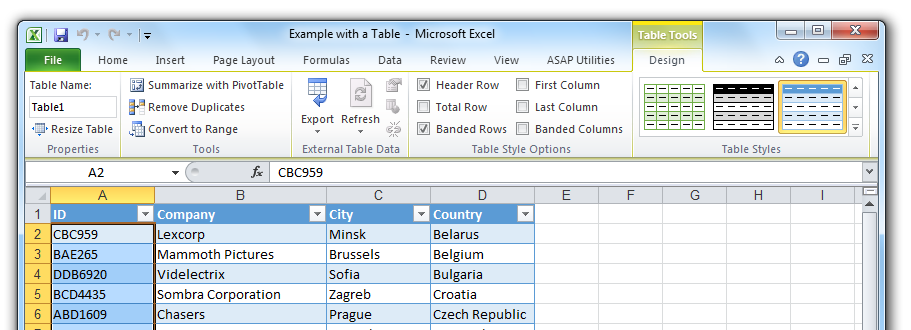
In Excel 2010/2013 some tools that edited data in a defined Table (a Table as via "Home > Format as Table" or "Insert > Table") on a worksheet with many formulas didn't run at the usual speed (sometimes it was even painfully slow). The speed difference could be huge compared to earlier Excel versions and compared to editing the same data when it was not in a defined Table*.
This is now fixed by using a workaround for this Excel bug.
(*) a Table as via "Home > Format as Table" or "Insert > Table".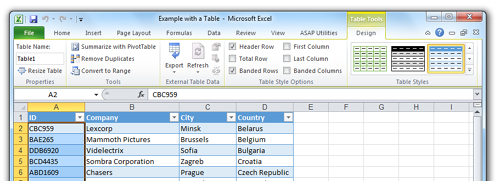
- General
A few small bug fixes and improvements.
When Excel 2013, 2010 or 2007 is doing something in the background and the running tool from ASAP Utilities has to wait for this, then this message is shown in the status bar "Waiting for response from Excel...".