

Tip of the Day | 2026年8月4日
Discover new tools to get things done.
舍入数字(不是格式设置,而是更改)...
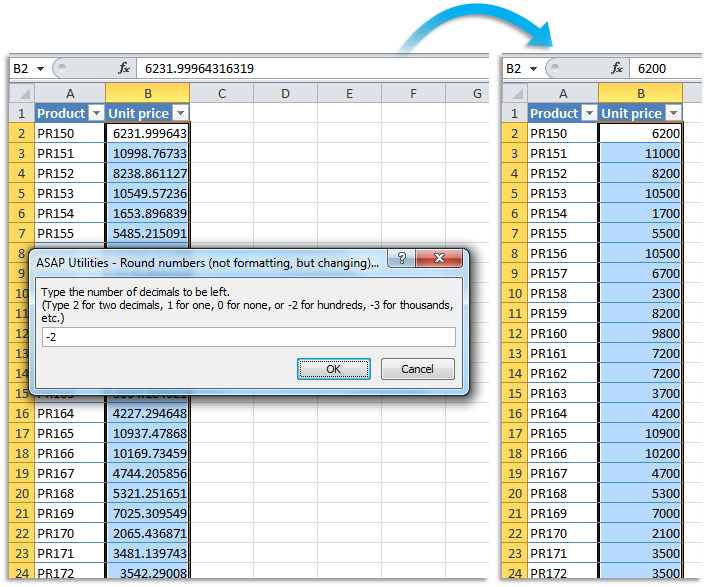
此实用工具会将所选单元格中的数字替换为舍入值。
此工具不是使用单元格格式设置来舍入数字,实际上是更改单元格中的值。
该实用工具会要求您提供一个数字来指定如何舍入,类似于 Excel 的 =ROUND() 函数:
- 正数: 将数字舍入到指定位数。
- 零: 将值舍入到最接近的整数。
- 负数: 数字将舍入到小数点左侧某个位数,例如,舍入到十位、百位、千位等。
例如,含有值 105.326 的单元格舍入到 1,则将变为 105.3;舍入到 0,则将变为 105;舍入到 -1,则将变为 110。
Starting this tool
Specify a Keyboard Shortcut: ASAP Utilities › My Tools & Shortcuts › Manage My Tools & Shortcuts...
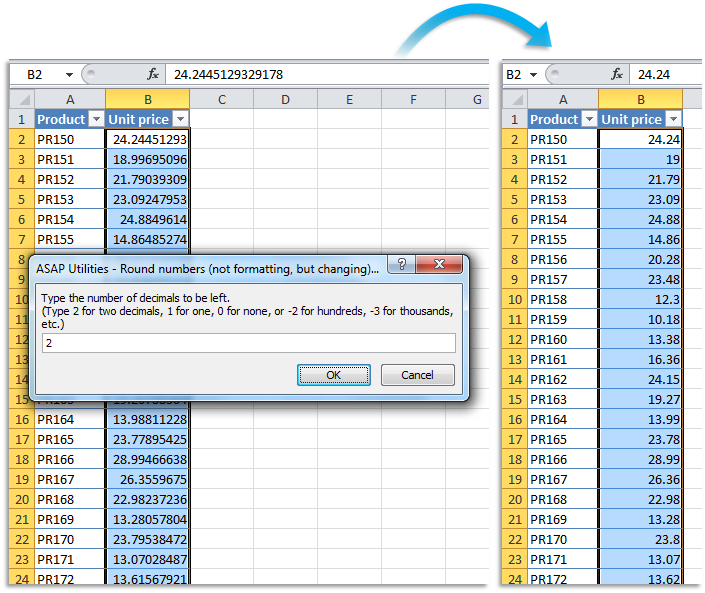
Example screenshot: B Round the selected numbers to the nearest integer (zero decimal places) (Here's the English version.)
.png "B Round the selected numbers to the nearest integer (zero decimal places) (Here's the English version.)")
Example screenshot: C Round the selected numbers to the nearest multiple of 100 (Here's the English version.)