


Add Leading Zeros to Reach Specific Length...
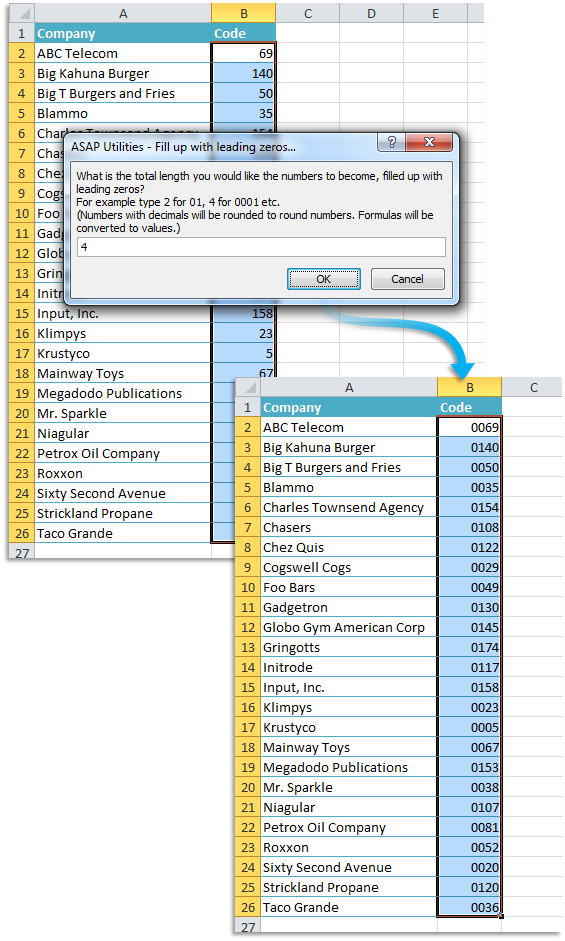
This tool adds leading zeros to numbers in your selected cells to make them all the same length.
For example, if you choose a total length of 5:
- 1 becomes 00001
- 34 becomes 00034
- 789 becomes 00789
- 12345 stays 12345 (already 5 digits)
This tool changes the actual values by adding zeros to the beginning.
If you only want to change how the number looks without changing the value, use Excel's cell formatting instead. For example, use the number format 00000.
Decimal numbers are rounded to the nearest whole number.
Formulas are replaced with their calculated values before adding the leading zeros.
This is useful for standardizing and padding codes, IDs, invoice numbers, or other values that need a fixed length for import into other systems.
Tip: If you want to remove the leading zeros later and convert the values back to real numbers, you can use our "Convert Numbers Stored as Text to Real Numbers" tool.
Starting this tool
Specify a Keyboard Shortcut: ASAP Utilities › My Tools & Shortcuts › Manage My Tools & Shortcuts...
Additional keywords to help you find this tool:
Pad numbers with zeros, Leading zeros fixed length, How to add zeros in front of numbers, Keep leading zeros, Pad number to 5 digits, Format number with leading zeros, Convert 1 to 00001, Leading zero padding tool, Make number 6 digits long, Fill number with zeros, Pad cells to fixed length, Standardize numbers with leading zeros, Convert number to string with leading zeros, Prefix zeros, Add leading zeros without formulas
Tip:Alt+P for the previous tool.
Tip: Alt+N for the next tool.

Save Time in Excel. The Easy Way.
ASAP Utilities helps you save time and do what Excel alone can't.
You can get started right away. No training needed.
Most users start with a few tools. Many end up using ASAP Utilities daily.
Used by teams in 28,500+ organizations.
Get Started with ASAP Utilities
Start saving time in Excel with practical tools you can use right away.
-
No sign-up required.
-
-
Free 90-day trial