


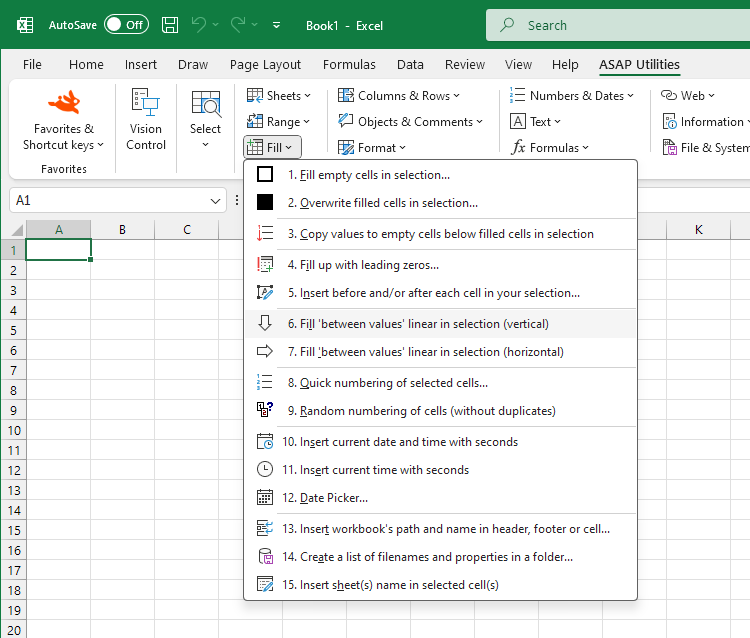
Fill Vertical with Linear Trend Series (Columns)
This tool fills your selected cells with values that follow a linear trend, calculated separately for each column based on the numbers already in that column's selection.
It uses Excel's built-in Fill Series feature with:
- Series in: Columns
- Type: Linear
- Trend: Yes (best-fit line through known values)
How it works:
The tool analyzes the numeric values found within the selected cells in each column, then fills accordingly:
- One value found: Fills upward and downward with a step of 1.
- Two values, in the first and last cell of the column selection: Fills only the blank cells between them evenly
- Two or more values, elsewhere in the column selection: Calculates a linear trend and fills all selected cells with the interpolated values. This may overwrite the existing values.
Examples:
-
One value:
- Before: (blank), (blank), 10, (blank), (blank)
- After: 8, 9, 10, 11, 12
-
Two values:
- Before: 10, (blank), (blank), 40
- After: 10, 20, 30, 40
-
Three or more values:
- Before: 12, (blank), 50, (blank), 800
- After: 12, -30.71, 50, 409.66, 800
This is useful for interpolating missing data, estimating values, or applying a numeric trend without using formulas.
It saves time compared to Excel's manual Home > Fill > Series with Trend option.
For even faster access, assign a custom shortcut via "My Tools & Shortcuts".
Starting this tool
Specify a Keyboard Shortcut: ASAP Utilities › My Tools & Shortcuts › Manage My Tools & Shortcuts...
Additional keywords to help you find this tool:
Fill missing values in Excel, Autofill linear trend, Fill series vertically, Interpolate missing data, Fill blank cells with trend, Linear trend fill, Fill values based on trend, Autofill numbers, Fill series with trendline, Fill numeric sequence vertically, Fill blank cells using linear interpolation, Copy down trend, Fill in between number, Generate number series columns, Fill cells with step values, Auto series fill vertical, Fill gaps in numeric data, Interpolate columns, Fill empty cells with estimated values
Tip:Alt+P for the previous tool.
Tip: Alt+N for the next tool.

Save Time in Excel. The Easy Way.
ASAP Utilities helps you save time and do what Excel alone can't.
You can get started right away. No training needed.
Most users start with a few tools. Many end up using ASAP Utilities daily.
Used by teams in 28,500+ organizations.
Get Started with ASAP Utilities
Start saving time in Excel with practical tools you can use right away.
-
No sign-up required.
-
-
Free 90-day trial