


Insert Unique Random Numbers
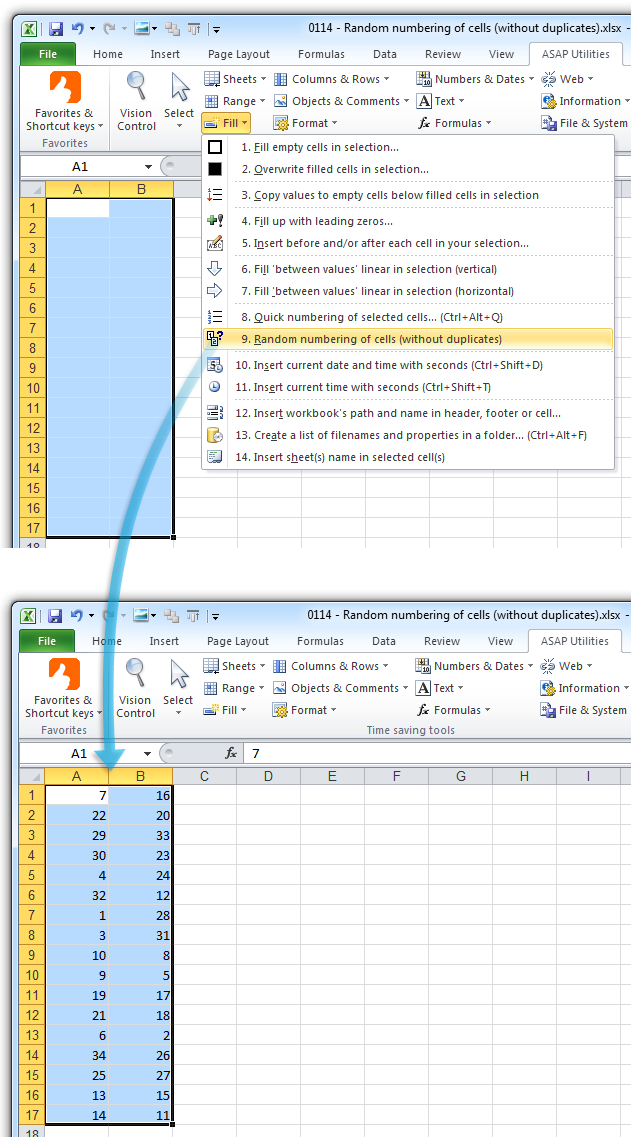
This tool fills the selected cells with unique random whole numbers.
Each number appears only once, so there are no duplicates.
The smallest number is always 1, and the largest equals the total number of selected cells.
For example, if you select 100 cells, the tool will insert a shuffled list of numbers from 1 to 100. Each number is used exactly once.
This is useful when you want to:
- Assign unique IDs in random order
- Create random rankings
- Randomize participants in a fair, reproducible way
Tip: To quickly shuffle a list or range in random order, use our "Advanced Sorting..." tool and choose the random sort option. It's easier than generating random numbers and sorting manually.
Note: Unlike Excel's RAND() or RANDBETWEEN() functions, this tool creates unique fixed values that don't change when the worksheet recalculates. This is helpful when reproducible results are needed, such as assigning participant IDs or generating stable randomized datasets.
Starting this tool
Specify a Keyboard Shortcut: ASAP Utilities › My Tools & Shortcuts › Manage My Tools & Shortcuts...
Additional keywords to help you find this tool:
Insert unique random numbers in Excel, Generate random numbers without duplicates, Random number generator no duplicates, Fill cells with unique random numbers, Create random rankings, Assign random unique IDs, Randomize participant numbers, Shuffle numbers without repetition, Fill cells with shuffled numbers, Generate stable random numbers, Random integer list without repeats, Unique randomizer, Create randomized dataset, Number cells randomly without repeats, Fill selection with non-repeating random numbers, Fixed random values, Assign random row numbers
Tip:Alt+P for the previous tool.
Tip: Alt+N for the next tool.

Save Time in Excel. The Easy Way.
ASAP Utilities helps you save time and do what Excel alone can't.
You can get started right away. No training needed.
Most users start with a few tools. Many end up using ASAP Utilities daily.
Used by teams in 28,500+ organizations.
Get Started with ASAP Utilities
Start saving time in Excel with practical tools you can use right away.
-
No sign-up required.
-
-
Free 90-day trial