


Reshape Single Column into Table Form (Transpose in Steps)...
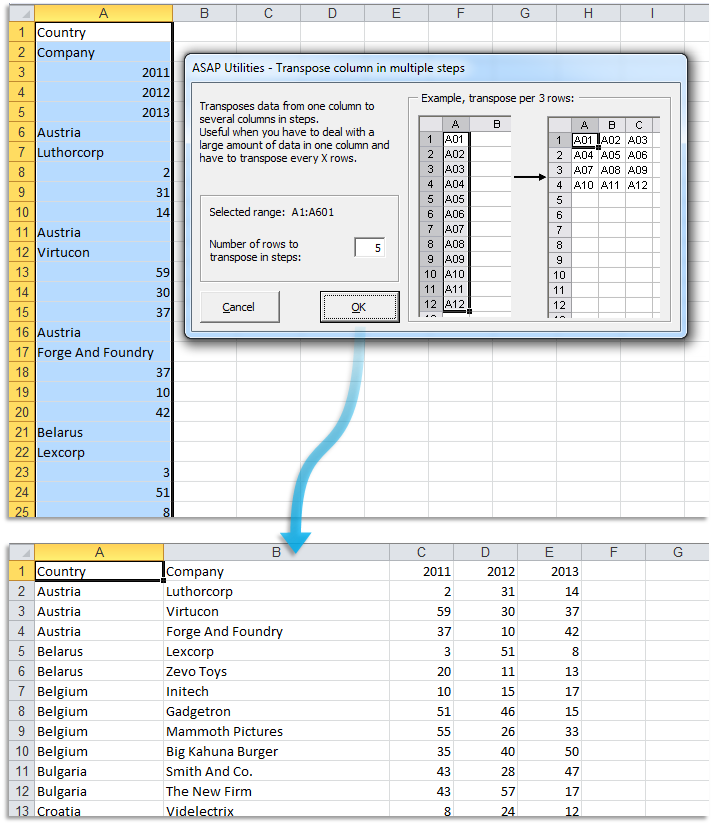
This tool reshapes data from a single column into table form by transposing your selected data in steps. It works by taking a specified number of rows from your column and converting them into columns.
This makes it easier to view and analyze large datasets that are originally in one long column.
For example, data from an older inventory system might export each product's details (product name, price, description, SKU) in one long column. Using this tool, you can group every four rows to form a structured table, where each row represents a complete product record.
Formulas and formatting are preserved, and you can set the number of rows to transpose per step to control the table layout.
Historical Note:
ASAP Utilities introduced this in 2001, long before Excel added the =WRAPROWS() function in 2022.
Starting this tool
Specify a Keyboard Shortcut: ASAP Utilities › My Tools & Shortcuts › Manage My Tools & Shortcuts...
Additional keywords to help you find this tool:
Reshape single column into table, Transpose column data in steps, Excel advanced transposer, Convert single column data to table, Transpose data from column to table, Split one column into multiple columns, Advanced transposer for Excel, Reshape data from single column into table form
Tip:Alt+P for the previous tool.
Tip: Alt+N for the next tool.

Save Time in Excel. The Easy Way.
ASAP Utilities helps you save time and do what Excel alone can't.
You can get started right away. No training needed.
Most users start with a few tools. Many end up using ASAP Utilities daily.
Used by teams in 28,500+ organizations.
Get Started with ASAP Utilities
Start saving time in Excel with practical tools you can use right away.
-
No sign-up required.
-
-
Free 90-day trial