


Split Long Dataset to New Sheet for Printing in Fewer Pages...
This tool helps you reshape a long, narrow dataset into a more compact layout for printing.
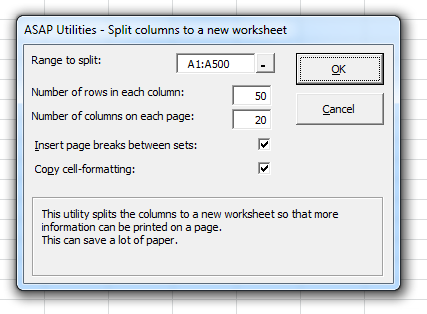
It splits your selected data into multiple vertical sections (like snaking columns, as seen in newsletters), side by side on a new worksheet. This allows more data to fit on a single printed page, saving paper and improving readability.
The original data remains untouched. The reorganized layout is created in a new worksheet.
You can choose:
- How many columns (sections) to split into
- How many rows each column should contain before wrapping to the next
- Whether to insert a page break between sets
- Whether to copy cell formatting
This is useful when:
- Printing long lists such as codes, names, or inventory
- Fitting more information per page without shrinking text size
- Reducing page count for exports, handouts, or printouts
Example:
Original data in one column:
A001
A002
A003
A004
A005
A006
After splitting into three columns of two rows each:
A001 A003 A005
A002 A004 A006
Note:
The data is split top-to-bottom, then left-to-right across columns, similar to how a multi-column newsletter or directory prints.
Your last used settings are automatically remembered.
Starting this tool
Specify a Keyboard Shortcut: ASAP Utilities › My Tools & Shortcuts › Manage My Tools & Shortcuts...
Additional keywords to help you find this tool:
Split long Excel column for printing, Split data into multiple columns, Snaking columns for print, Fit data to fewer pages, Print long list across columns, Layout for compact printing, Save paper when printing, Print more rows per page, Convert single column to multiple columns, Reshape data for printing, Snake column layout, Print Excel data side by side, Page layout multiple columns, Rearrange data for better print layout, Split Excel column top to bottom, Create printable report layout, Fit narrow list across page, Reduce print pages
Tip:Alt+P for the previous tool.
Tip: Alt+N for the next tool.

Save Time in Excel. The Easy Way.
ASAP Utilities helps you save time and do what Excel alone can't.
You can get started right away. No training needed.
Most users start with a few tools. Many end up using ASAP Utilities daily.
Used by teams in 28,500+ organizations.
Get Started with ASAP Utilities
Start saving time in Excel with practical tools you can use right away.
-
No sign-up required.
-
-
Free 90-day trial