


Show a Significant Number of Non-Zero Decimals...
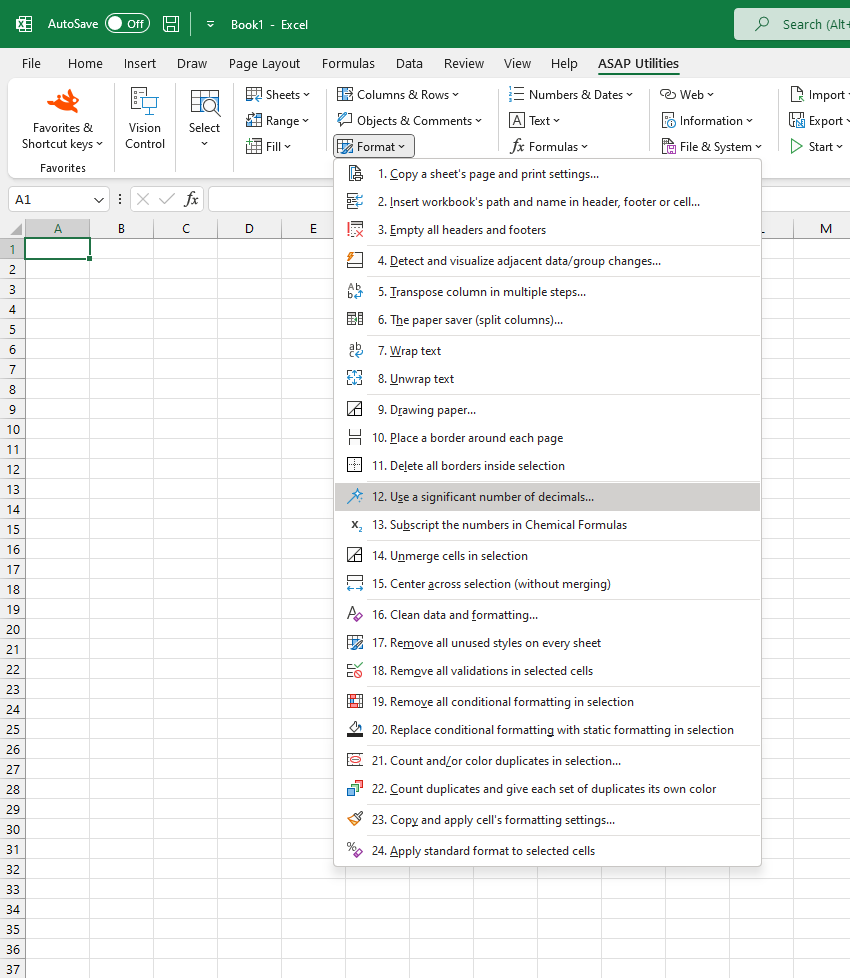
This tool modifies the number format in your selected cells to show a significant number of non-zero decimal places without rounding the values.
Unlike standard rounding, this tool skips trailing zeros directly after the decimal character and ensures that the first few non-zero digits after the decimal are always visible.
For example, if you specify three significant decimals:
- The value "25.0123456" will be shown as "25.0123" instead of "25.012" with standard rounding.
- The value "25.00001234" will be shown as "25.0000123" instead of "25.000" with standard rounding.
It helps make subtle numeric differences more visible in your data, especially when working with scientific values, financial figures, or imported datasets that require detailed precision.
Starting this tool
Specify a Keyboard Shortcut: ASAP Utilities › My Tools & Shortcuts › Manage My Tools & Shortcuts...
Additional keywords to help you find this tool:
Show more decimal places in Excel, Show decimals without rounding, Excel format for non-zero decimals, Display significant decimal digits, Preserve decimal precision, Number format keep non-zero digits, Avoid rounding decimal numbers, Excel show hidden decimal places, Custom decimal formatting, Scientific number formatting
Tip:Alt+P for the previous tool.
Tip: Alt+N for the next tool.

Save Time in Excel. The Easy Way.
ASAP Utilities helps you save time and do what Excel alone can't.
You can get started right away. No training needed.
Most users start with a few tools. Many end up using ASAP Utilities daily.
Used by teams in 28,500+ organizations.
Get Started with ASAP Utilities
Start saving time in Excel with practical tools you can use right away.
-
No sign-up required.
-
-
Free 90-day trial