


Copy and Apply Certain Cell Formatting Settings...
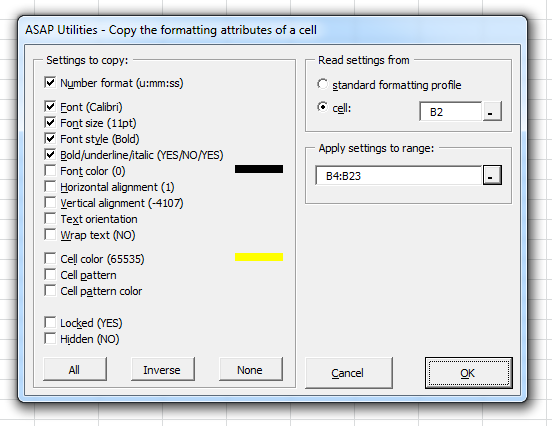
This tool lets you copy specific formatting settings from one cell and apply them to other cells in your worksheet.
Unlike Excel's Format Painter, which copies all formatting at once, this tool gives you complete control.
You can choose exactly which formatting options to copy and apply.
You can copy one or more of the following formatting settings:
- Number format
- Font
- Font size
- Font style
- Bold/underline/italic
- Font color
- Horizontal alignment
- Vertical alignment
- Text orientation
- Wrap text
- Cell color
- Cell pattern
- Cell pattern color
- Locked
- Hidden
The All, Invert, and None buttons allow you to quickly choose which settings to copy.
You can choose to copy formatting from:
- A specific cell in your worksheet
- The standard formatting profile
The formatting can then be applied to a selected range.
Your last used settings are automatically remembered for quick reuse.
This tool is helpful when you want more flexibility than Excel's Format Painter, especially when working with complex formatting or selectively applying styles without affecting everything.
Starting this tool
Specify a Keyboard Shortcut: ASAP Utilities › My Tools & Shortcuts › Manage My Tools & Shortcuts...
Additional keywords to help you find this tool:
Copy cell formatting, Apply specific formatting, Format painter alternative, Copy only number format in Excel, Copy font and colour only, Copy formatting without content, Paste formatting settings, Apply selected formatting settings, Copy fill colour, Copy formatting from one cell to another, Copy font colour and alignment, Transfer cell formatting, Copy cell formatting options, Wrap text and alignment formatting, Copy bold and italic settings in Excel
Tip:Alt+P for the previous tool.
Tip: Alt+N for the next tool.

Save Time in Excel. The Easy Way.
ASAP Utilities helps you save time and do what Excel alone can't.
You can get started right away. No training needed.
Most users start with a few tools. Many end up using ASAP Utilities daily.
Used by teams in 28,500+ organizations.
Get Started with ASAP Utilities
Start saving time in Excel with practical tools you can use right away.
-
No sign-up required.
-
-
Free 90-day trial