


Clean Up Data and Formatting...
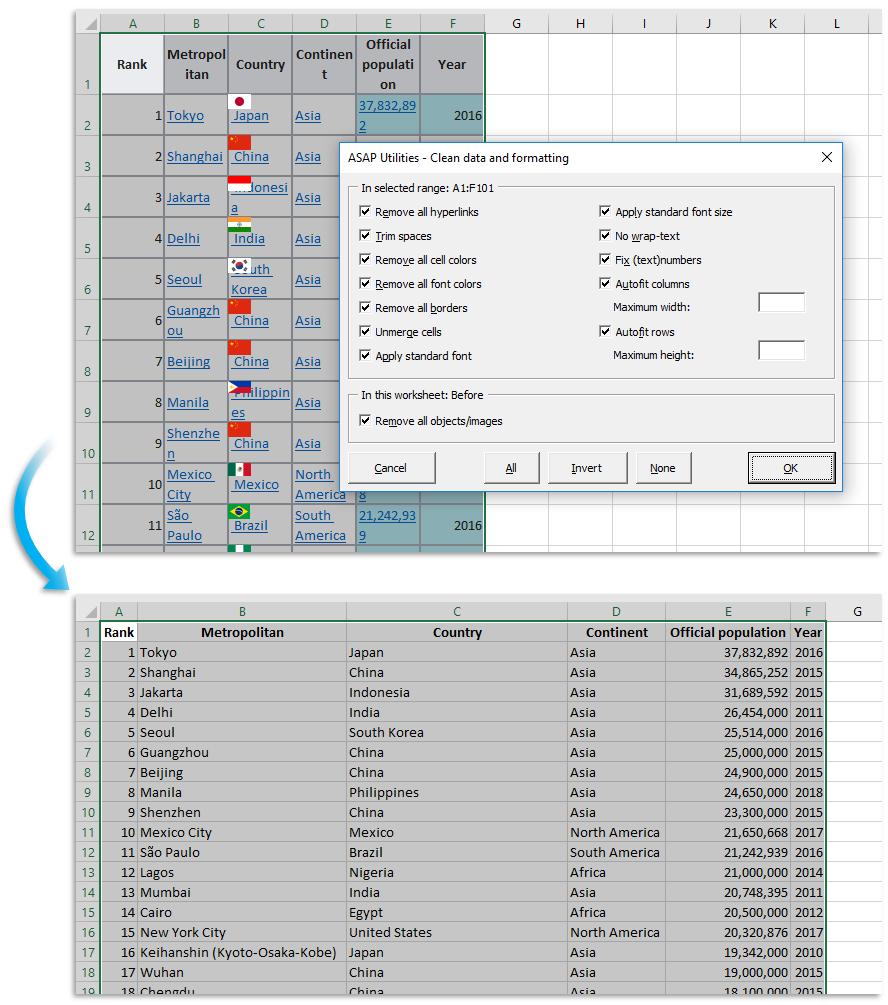
This tool helps you quickly clean up data and formatting issues in your selected range.
It's useful when working with pasted or imported data, exports from other systems, or spreadsheets with inconsistent formatting and values.
Instead of manually fixing everything, you can apply multiple cleanup actions in one go, saving time and making your data easier to work with.
You can choose to apply any combination of the following actions:
- Remove all hyperlinks
- Trim leading and trailing spaces
- Remove all fill colors
- Remove all font colors
- Remove all borders
- Unmerge cells
- Apply the standard font
- Apply the standard font size
- Turn off wrap text
- Fix numbers stored as text
- Autofit column widths
- Autofit row heights
- Remove all objects and images from the worksheet
Your last used settings are automatically remembered so that you can repeat your preferred cleanup steps quickly.
By default, you can launch this tool using the Control+Alt+Shift+C shortcut.
Starting this tool
Specify a Keyboard Shortcut: ASAP Utilities › My Tools & Shortcuts › Manage My Tools & Shortcuts...
Additional keywords to help you find this tool:
Clean up Excel data, Remove extra spaces, Clean formatting in Excel, Fix numbers stored as text, Trim spaces tool, Remove unwanted formatting, Remove hyperlinks, Unmerge cells, Reset Excel formatting, Clean copied data, Prepare data for analysis, Remove fill color, Fix pasted data, Clean data from website, Tidy up spreadsheet, Remove cell borders, Remove font color, Standardize cell formatting, Autofit columns and rows, Bulk clean data, Textnumbers, Convert imported values, Clean dataset, Clean information that is copied from websites
Tip:Alt+P for the previous tool.
Tip: Alt+N for the next tool.

Save Time in Excel. The Easy Way.
ASAP Utilities helps you save time and do what Excel alone can't.
You can get started right away. No training needed.
Most users start with a few tools. Many end up using ASAP Utilities daily.
Used by teams in 28,500+ organizations.
Get Started with ASAP Utilities
Start saving time in Excel with practical tools you can use right away.
-
No sign-up required.
-
-
Free 90-day trial