


Show Folder Paths and File Names in Title Bar
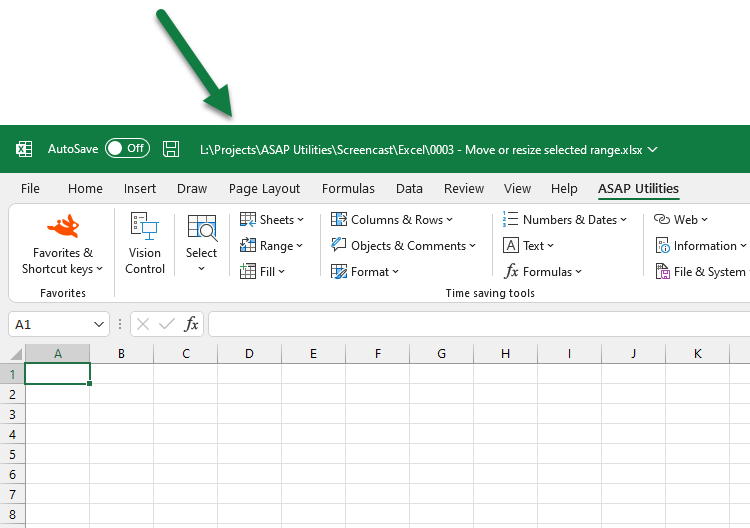
This tool displays the folder path and file name of your open workbooks in Excel's title bar.
By default, Excel only shows the file name in the title bar, not the folder path. This tool makes it easier to see exactly where each file is stored, which is especially helpful when you have workbooks with similar names stored in different folders.
It's useful when:
- Working with files that have similar names but are stored in different folders
- Avoiding confusion when multiple files are open
- Seeing the full location of a file at a glance without needing to check File > Info
Important to know:
- The full path and file name are shown for all currently open workbooks.
-
This information is not updated automatically. You'll need to rerun the tool if you:
- Save the file with a new name
- Move the file to a different folder
- Open or create a new file
- Restart Excel
Tip:
If you use this tool frequently, you can add it to your 'My Tools & Shortcut Keys' menu and assign a shortcut key for quick access.
Starting this tool
Specify a Keyboard Shortcut: ASAP Utilities › My Tools & Shortcuts › Manage My Tools & Shortcuts...
Additional keywords to help you find this tool:
show full path, show folder path, display full file path, view file location, show file location in title bar, show workbook path, see file path in Excel, display folder and filename, show full filename, show file path in window title, add folder path to title bar, see full path in Excel title, identify file location, working with similar filenames, distinguish files, file path visibility, titlebar customization, show open file location, display full workbook name, show path of open files
Tip:Alt+P for the previous tool.
Tip: Alt+N for the next tool.

Save Time in Excel. The Easy Way.
ASAP Utilities helps you save time and do what Excel alone can't.
You can get started right away. No training needed.
Most users start with a few tools. Many end up using ASAP Utilities daily.
Used by teams in 28,500+ organizations.
Get Started with ASAP Utilities
Start saving time in Excel with practical tools you can use right away.
-
No sign-up required.
-
-
Free 90-day trial