


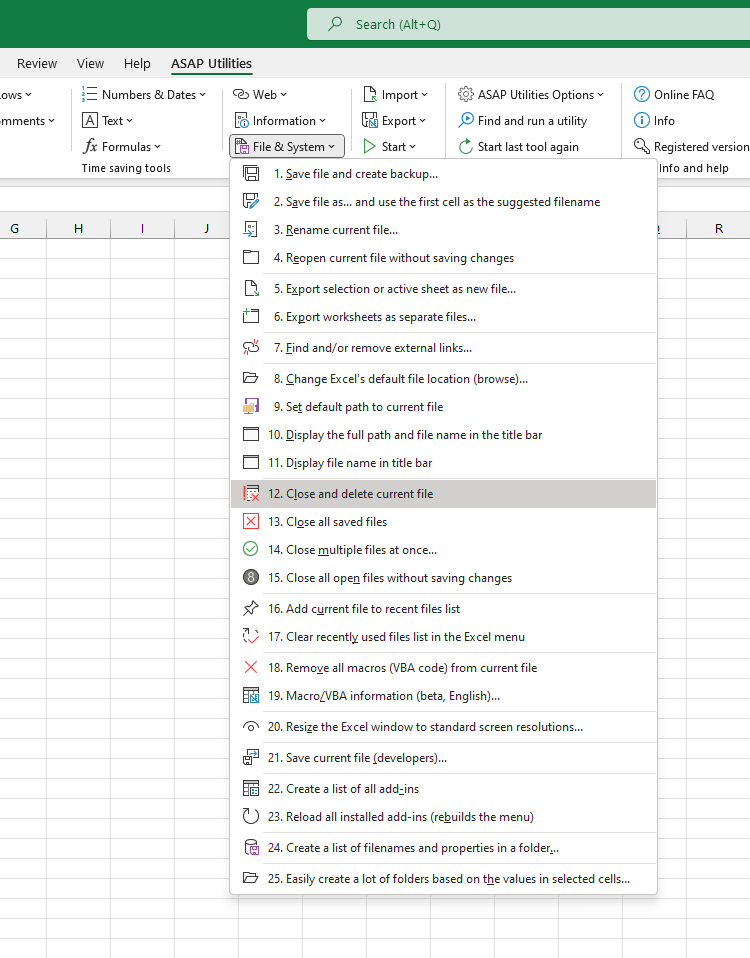
Close and Delete Current File
This tool closes your current file and deletes it from your computer.
You'll always get a confirmation prompt before the file is deleted, to help prevent accidental mistakes.
It's a quick way to remove a file you no longer need, without manually closing it first and then finding and deleting the file in File Explorer.
How it works:
- The current file is closed.
- If possible, the file is moved to your Recycle Bin (so you can restore it later if needed).
- If moving to the Recycle Bin isn't possible (for example, on a network drive), you'll be asked if you want to delete the file permanently.
It's useful when:
- Cleaning up temporary or test files
- Removing outdated files after saving a newer version
- Quickly deleting a file you no longer need directly from Excel
Starting this tool
Specify a Keyboard Shortcut: ASAP Utilities › My Tools & Shortcuts › Manage My Tools & Shortcuts...
Additional keywords to help you find this tool:
delete active file, delete current workbook, delete file from Excel, close and delete file, remove file directly from Excel, delete Excel file, close and remove workbook, delete saved file, clean up test files, delete temporary file, remove outdated workbook, delete opened file, remove file after saving, send file to recycle bin, permanently delete Excel file, delete file without file explorer, delete file with confirmation, delete file from computer, Excel delete file tool, delete and close workbook
Tip:Alt+P for the previous tool.
Tip: Alt+N for the next tool.

Save Time in Excel. The Easy Way.
ASAP Utilities helps you save time and do what Excel alone can't.
You can get started right away. No training needed.
Most users start with a few tools. Many end up using ASAP Utilities daily.
Used by teams in 28,500+ organizations.
Get Started with ASAP Utilities
Start saving time in Excel with practical tools you can use right away.
-
No sign-up required.
-
-
Free 90-day trial