


Create Folder Structure in a Destination Folder from Cell Values...
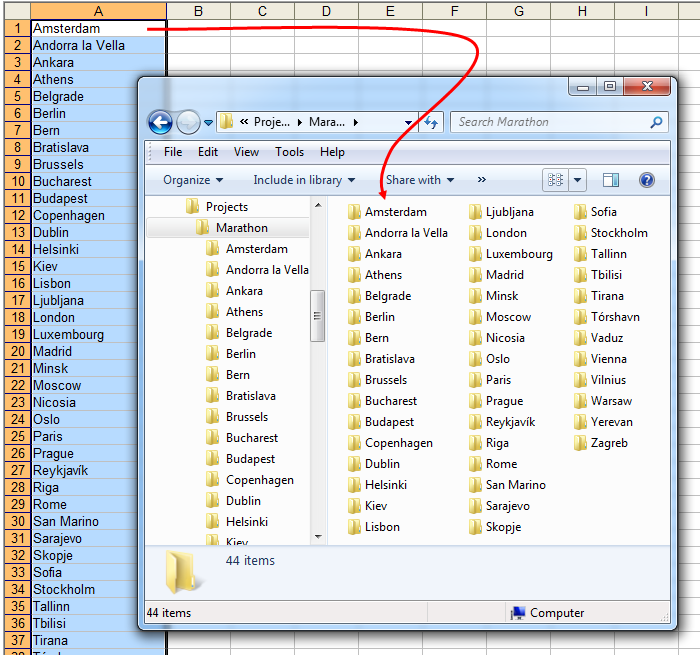
This tool lets you quickly create a full folder structure using the values in your selected Excel cells.
It works like this:
- Select the cells that contain the folder names or folder\subfolder paths
- Start this tool
- Pick a destination folder
- The tool creates a new folder for each value in your selection
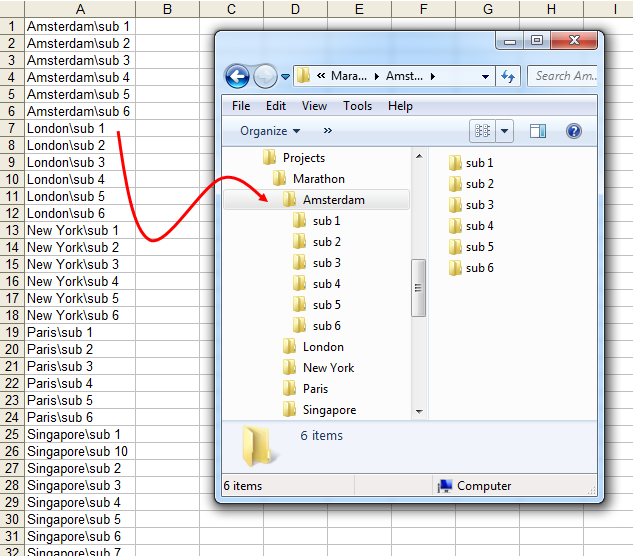
The tool also supports subfolders by using backslashes in the cell values.
For example, if a cell contains "Projects\2025\Q1", it will create the full nested path on your selected drive, such as:
C:\Documents\Projects\2025\Q1
This is useful when you need to:
- Create a folder hierarchy from a list in Excel
- Mirror or prepare a structured directory setup
- Automate folder creation for projects, clients, events, or teams
Some characters cannot be used in folder names. These characters are automatically handled and replaced with an underscore (_).
Tip: Enter only folder names or paths like folder\subfolder. Do not include a drive letter, such as C:\. The tool will automatically create the folders in the location you select.
Starting this tool
Specify a Keyboard Shortcut: ASAP Utilities › My Tools & Shortcuts › Manage My Tools & Shortcuts...
Example screenshot: 2 Create folders and subfolders by using the backslash character in the cells (Here's the English version.)
Additional keywords to help you find this tool:
create folders from Excel, generate folder structure, Excel to folders, batch folder creator, create directories from cell values, Excel folder automation, folder path from Excel, create nested folders, Excel folder list to structure
Tip:Alt+P for the previous tool.
Tip: Alt+N for the next tool.

Save Time in Excel. The Easy Way.
ASAP Utilities helps you save time and do what Excel alone can't.
You can get started right away. No training needed.
Most users start with a few tools. Many end up using ASAP Utilities daily.
Used by teams in 28,500+ organizations.
Get Started with ASAP Utilities
Start saving time in Excel with practical tools you can use right away.
-
No sign-up required.
-
-
Free 90-day trial