


Close All Open Files Without Saving Changes
It's a quick way to discard all changes and close everything at once, such as when working with test files or if you want to reset your workspace quickly.
How it works:
- A confirmation message will always appear first, asking if you are sure you want to close all files without saving any changes.
- If confirmed, all open files will be closed immediately without saving changes.
- Any unsaved changes will be lost.
- Excel stays open, and add-ins or hidden workbooks (such as PERSONAL.XLSB) will not be closed.
It's useful when:
- You quickly want to close everything without saving
- You are working with test files or temporary data
- You have made changes you don't want to keep
- You want to skip Excel's save confirmation messages for every file
- You want to reset your Excel workspace without closing Excel
Note: Only use this tool when you are sure you don't want to keep any changes. After confirmation, all unsaved changes will be lost.
Starting this tool
Specify a Keyboard Shortcut: ASAP Utilities › My Tools & Shortcuts › Manage My Tools & Shortcuts...
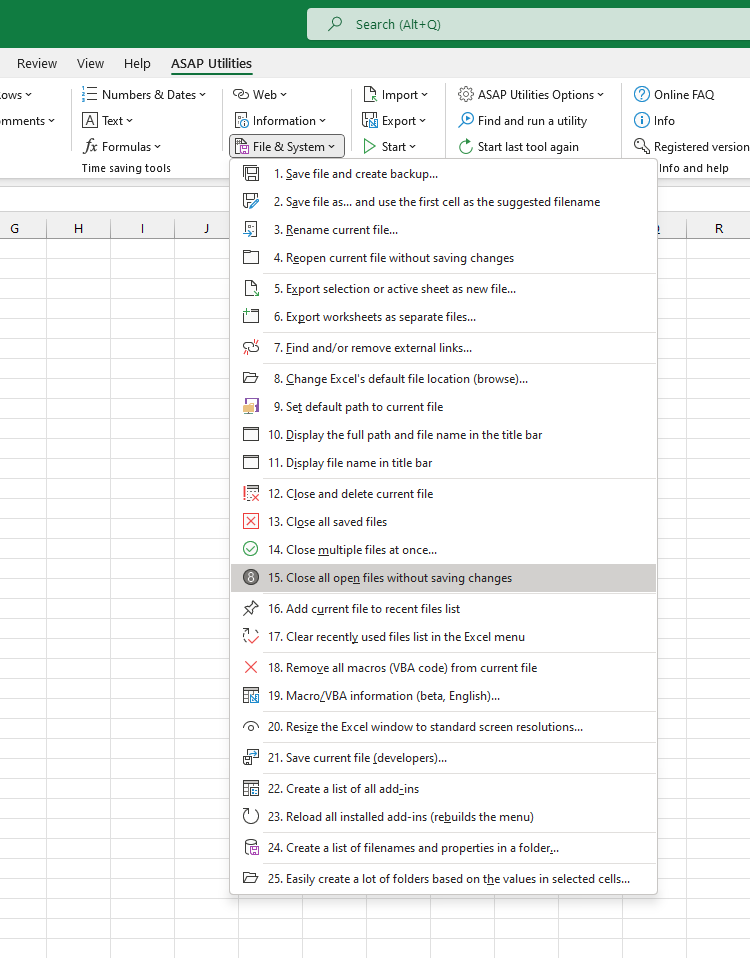
Additional keywords to help you find this tool:
close all Excel files without saving, discard all changes in Excel, force close Excel workbooks, close multiple Excel files quickly, close all unsaved Excel files, close all open files in Excel, skip save prompts in Excel, close Excel files without confirmation, close workbooks without saving changes, discard changes tool for Excel, Excel close all without saving, mass close Excel files, batch close Excel files, close test files in Excel, reset Excel workspace, Excel don't save changes, undo all changes Excel, force close without save Excel, close files instantly Excel, Excel close files fast
Tip:Alt+P for the previous tool.
Tip: Alt+N for the next tool.

Save Time in Excel. The Easy Way.
ASAP Utilities helps you save time and do what Excel alone can't.
You can get started right away. No training needed.
Most users start with a few tools. Many end up using ASAP Utilities daily.
Used by teams in 28,500+ organizations.
Get Started with ASAP Utilities
Start saving time in Excel with practical tools you can use right away.
-
No sign-up required.
-
-
Free 90-day trial