


Workbook and Selection Details...
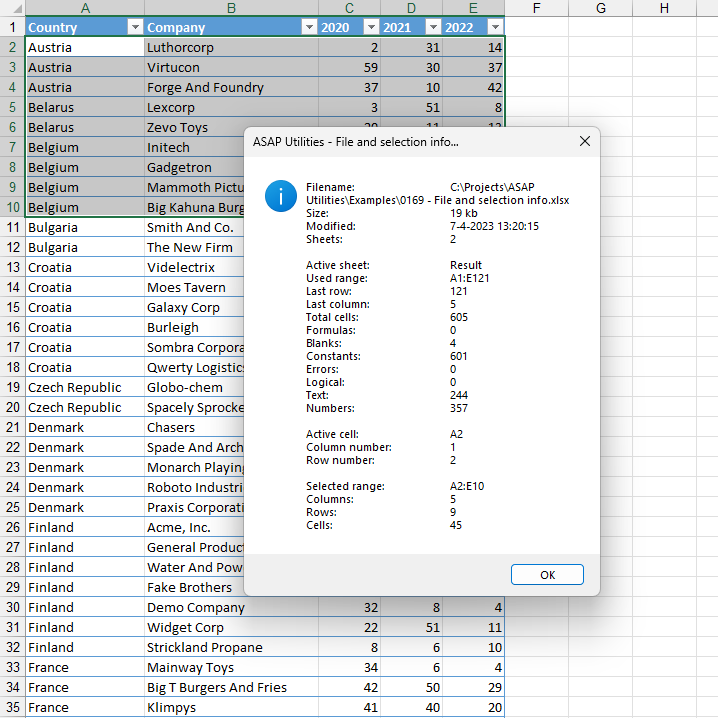
This tool displays detailed information about your Excel workbook, the active worksheet, and your current selection.
It provides the following information:
File details:
- File name
- File size
- Last modified date
- Number of sheets in the workbook
Active sheet details:
- Sheet name
- Used range address
- Last row and last column used
- Total number of cells in the used range
- Number of cells with formulas
- Number of blank cells
- Number of constants (non-formula values)
- Number of cells with errors
- Number of logical (TRUE/FALSE) values
- Number of text values
- Number of numeric values
Selection details:
- Address of the active cell
- Row and column number of the active cell
- Address of the selected range
- Number of columns, rows, and cells in the selection
This overview helps you better understand the structure of your file and selection.
Starting this tool
Specify a Keyboard Shortcut: ASAP Utilities › My Tools & Shortcuts › Manage My Tools & Shortcuts...
Additional keywords to help you find this tool:
Excel file info, workbook details, show file properties, active sheet info, used range details, cell types summary, selection details, selected range info, get workbook statistics, number of sheets in workbook
Tip:Alt+P for the previous tool.
Tip: Alt+N for the next tool.

Save Time in Excel. The Easy Way.
ASAP Utilities helps you save time and do what Excel alone can't.
You can get started right away. No training needed.
Most users start with a few tools. Many end up using ASAP Utilities daily.
Used by teams in 28,500+ organizations.
Get Started with ASAP Utilities
Start saving time in Excel with practical tools you can use right away.
-
No sign-up required.
-
-
Free 90-day trial