


Count Distinct Values in Selection
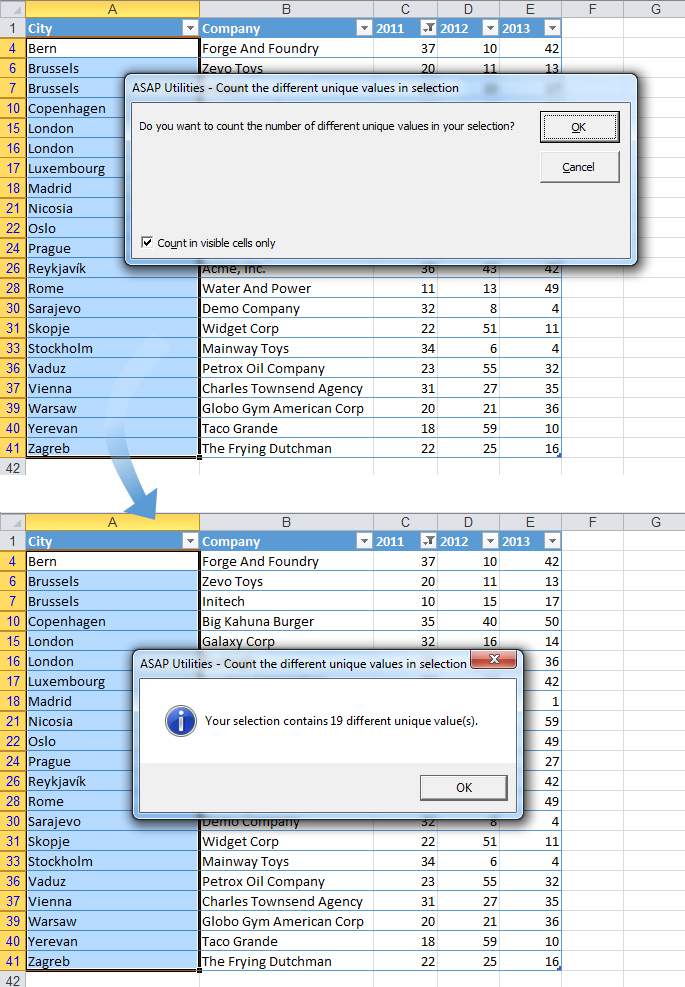
This tool checks the number of distinct (also called unique) values in your selected range and informs you of the number found.
Each value is counted only once, even if it appears multiple times. This means all values that are different from each other are included in the count.
You can choose whether to include hidden cells in your selection, which is useful when working with filtered lists.
Note:
- The tool is case-sensitive. For example, "Excel" and "EXCEL" are considered different values.
- If your selection includes formulas, the tool compares the calculated values, not the formulas themselves. For instance, if one cell displays the number 12 and another contains the formula =3*4, resulting in 12, they are considered duplicates.
- In some instances, such as when working with long numeric values like credit card numbers, this tool provides more accurate results than Excel's built-in methods like Conditional Formatting or COUNTIF, which can misidentify such values as duplicates due to rounding.
Starting this tool
Specify a Keyboard Shortcut: ASAP Utilities › My Tools & Shortcuts › Manage My Tools & Shortcuts...
Additional keywords to help you find this tool:
count unique values, distinct values in Excel, count different values, count non-duplicate values, how many unique values in selection, Excel distinct value counter, count unique items, count different entries in range, Excel non-repeating values, count values that are different, find all unique values in range, count filtered unique values, unique value checker
Tip:Alt+P for the previous tool.
Tip: Alt+N for the next tool.

Save Time in Excel. The Easy Way.
ASAP Utilities helps you save time and do what Excel alone can't.
You can get started right away. No training needed.
Most users start with a few tools. Many end up using ASAP Utilities daily.
Used by teams in 28,500+ organizations.
Get Started with ASAP Utilities
Start saving time in Excel with practical tools you can use right away.
-
No sign-up required.
-
-
Free 90-day trial