


List Document Properties from Workbook (Title, Author, etc.)
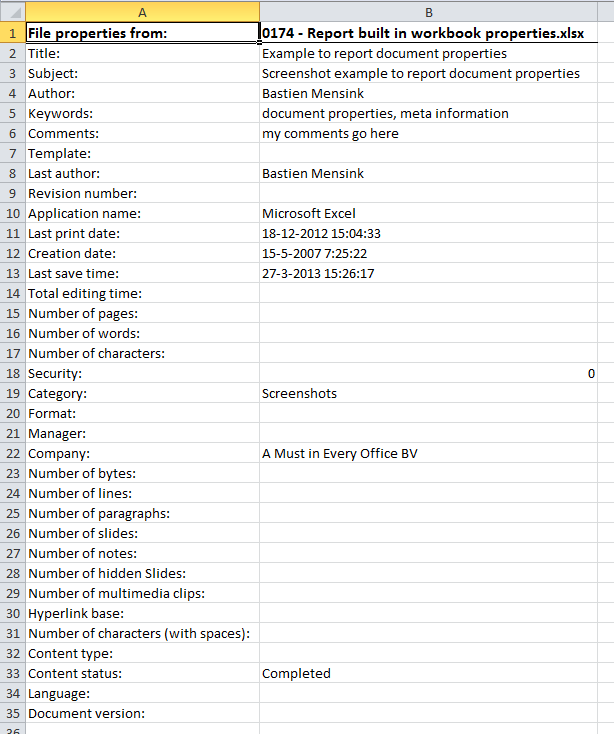
This tool creates a detailed list of all built-in document properties from your active workbook.
It asks you to confirm the file, then creates a new workbook containing a report of properties such as:
- Title, Subject, Author, Last Author
- Company, Manager, Category, Comments
- Created, Last Saved, and Last Printed date
-
Keywords, status, revision number, and more
Some fields, such as word count, character count, number of pages, paragraphs, or multimedia clips, are included in the report but are typically empty in Excel workbooks. These fields are primarily used in Word or PowerPoint and are not populated by Excel.
This report helps you:
- Review or audit document metadata
- Check or clean file properties before sharing
- Document file details for archiving or compliance
All data is pulled from the workbook's built-in properties, many of which are also visible under File > Info > Properties in Excel.
Starting this tool
Specify a Keyboard Shortcut: ASAP Utilities › My Tools & Shortcuts › Manage My Tools & Shortcuts...
Additional keywords to help you find this tool:
Excel document properties, file metadata, workbook properties report, list file properties Excel, Excel file information, extract document properties, built-in properties Excel, audit Excel file details, Excel workbook info, show file details Excel, list workbook info, Excel file summary, document property list tool
Tip:Alt+P for the previous tool.
Tip: Alt+N for the next tool.

Save Time in Excel. The Easy Way.
ASAP Utilities helps you save time and do what Excel alone can't.
You can get started right away. No training needed.
Most users start with a few tools. Many end up using ASAP Utilities daily.
Used by teams in 28,500+ organizations.
Get Started with ASAP Utilities
Start saving time in Excel with practical tools you can use right away.
-
No sign-up required.
-
-
Free 90-day trial