


List All Sheet Names in Workbook
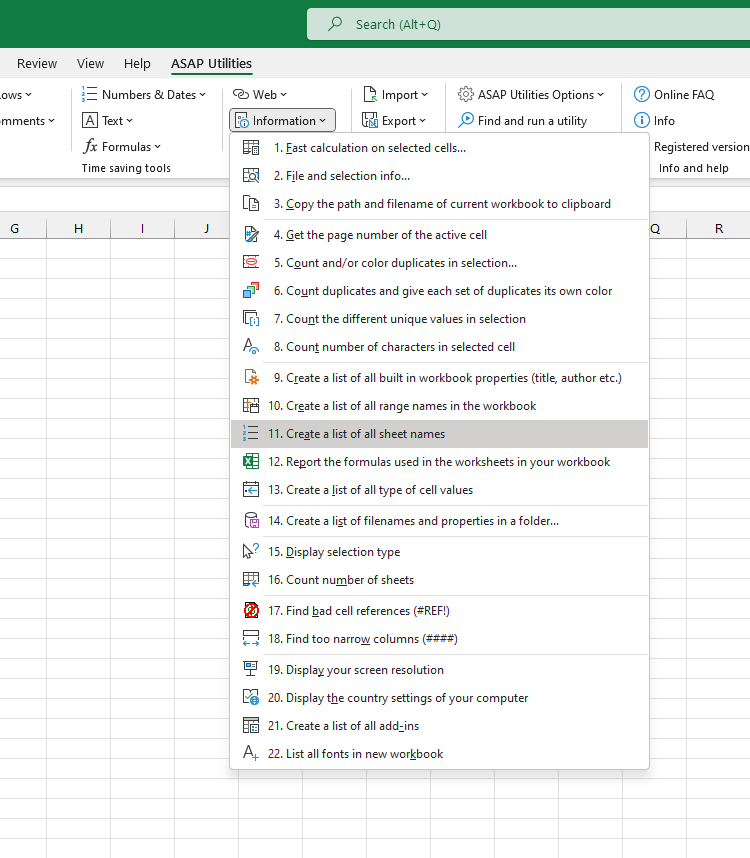
This tool creates a list of all worksheet names in your current workbook.
It generates a new workbook with a simple report showing the names of each sheet, one per row. This helps you quickly review or document the structure of your workbook.
Use it to:
- Get a quick overview of all sheet names
- Document or audit your workbook layout
- Spot missing, extra, or default-named sheets (like "Sheet1", "Sheet2")
Tip:
You might also be interested in the "Create an Index Page (TOC) with Clickable Links to All Sheets..." tool, which inserts a clickable table of contents in your workbook.
Starting this tool
Specify a Keyboard Shortcut: ASAP Utilities › My Tools & Shortcuts › Manage My Tools & Shortcuts...
Additional keywords to help you find this tool:
get all worksheet names, workbook sheet overview, list worksheet names, export sheet names, sheet name report, view all sheet names, tab names, show sheet names in Excel, audit sheet names, workbook tab names, generate sheet name list, list all tabs, print sheet names, sheet summary
Tip:Alt+P for the previous tool.
Tip: Alt+N for the next tool.

Save Time in Excel. The Easy Way.
ASAP Utilities helps you save time and do what Excel alone can't.
You can get started right away. No training needed.
Most users start with a few tools. Many end up using ASAP Utilities daily.
Used by teams in 28,500+ organizations.
Get Started with ASAP Utilities
Start saving time in Excel with practical tools you can use right away.
-
No sign-up required.
-
-
Free 90-day trial