


Print Selection
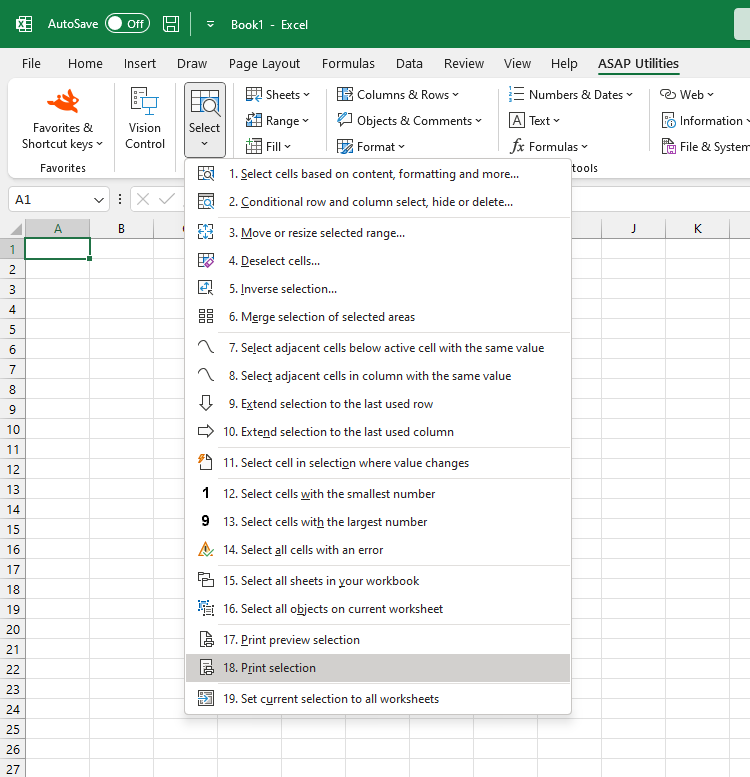
Instantly print your selected range or chart to your default printer in Excel.
This tool saves time by skipping the print dialog and sending your selection directly to the printer. It's useful when you frequently need to print specific data without adjusting settings each time.
Tip: If you use this frequently, add it to your 'My Tools & Shortcuts' menu and assign a shortcut for faster access.
Starting this tool
Click › Select › 18. Print Selection
Specify a Keyboard Shortcut: ASAP Utilities › My Tools & Shortcuts › Manage My Tools & Shortcuts...
Additional keywords to help you find this tool:
Print selection in Excel, Print only selected range, Quick print selection, Print selected chart only, Excel shortcut to print selected data, How to print only selected cells in Excel, Excel print only highlighted area, Instantly print selected range in Excel, Can I print just my selected chart in Excel?
Tip:Alt+P for the previous tool.
Tip: Alt+N for the next tool.

Save Time in Excel. The Easy Way.
ASAP Utilities helps you save time and do what Excel alone can't.
You can get started right away. No training needed.
Most users start with a few tools. Many end up using ASAP Utilities daily.
Used by teams in 28,500+ organizations.
Get Started with ASAP Utilities
Start saving time in Excel with practical tools you can use right away.
-
No sign-up required.
-
-
Free 90-day trial