


Merge and Import Multiple Files (TXT, CSV, Excel, etc.)...
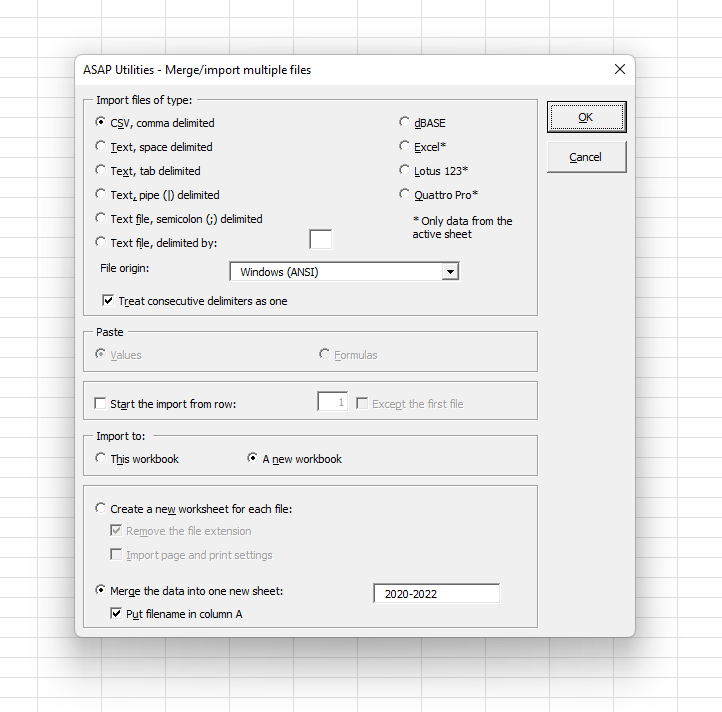
This tool lets you import or merge multiple files from a folder into Excel in one go.
You can choose to:
- Import each file into its own worksheet
- Merge the contents of all files into a single sheet (stacked vertically)
You can also:
- Start the import from a specific row (e.g., skip headers)
- Apply special handling for the first file (e.g., include headers only once)
- Import into the current workbook or create a new one
Supported file types include:
- CSV and other text files: comma-, tab-, semicolon-, space-, pipe (|)-, exclamation mark (!)-delimited, or a custom delimiter
-
Excel formats:
- Excel Workbook (.xlsx)
- Excel Macro-Enabled Workbook (.xlsm)
- Excel Binary Workbook (.xlsb)
- Excel 97-2003 Workbook (.xls)
- Strict Open XML Spreadsheet (.xlsx)
- Excel Template (.xltx)
- Excel Macro-Enabled Template (.xltm)
- Excel 97-2003 Template (.xlt)
- XML Spreadsheet (.xml)
- OpenDocument Spreadsheet (.ods)
- Microsoft Excel 5.0/95 Workbook (*.xls)
-
dBASE files (*.dbf)
For multi-sheet spreadsheet files, only the active sheet from each file is imported.
Your last used settings and folder location are remembered.
This tool is ideal when you want to:
- Combine hundreds of files into one workbook quickly
- Eliminate repetitive manual file opening and copying
- Prepare datasets for analysis or reporting
Note:
For more advanced import and transformation tasks, consider using Excel's built-in Power Query (Data > Get & Transform Data).
Starting this tool
Specify a Keyboard Shortcut: ASAP Utilities › My Tools & Shortcuts › Manage My Tools & Shortcuts...
Additional keywords to help you find this tool:
batch import Excel files, merge text files in Excel, import folder of files, stack CSV files, Excel batch merge, merge Excel and CSV files, import many files into one workbook, automate file import in Excel, combine Excel and text files, import and append data in Excel, bulk file import Excel, Excel merge utility, merge files together in a new file, import files from directory
Tip:Alt+P for the previous tool.
Tip: Alt+N for the next tool.

Save Time in Excel. The Easy Way.
ASAP Utilities helps you save time and do what Excel alone can't.
You can get started right away. No training needed.
Most users start with a few tools. Many end up using ASAP Utilities daily.
Used by teams in 28,500+ organizations.
Get Started with ASAP Utilities
Start saving time in Excel with practical tools you can use right away.
-
No sign-up required.
-
-
Free 90-day trial