


Remove Trailing Line Breaks (e.g., Alt+Enter)
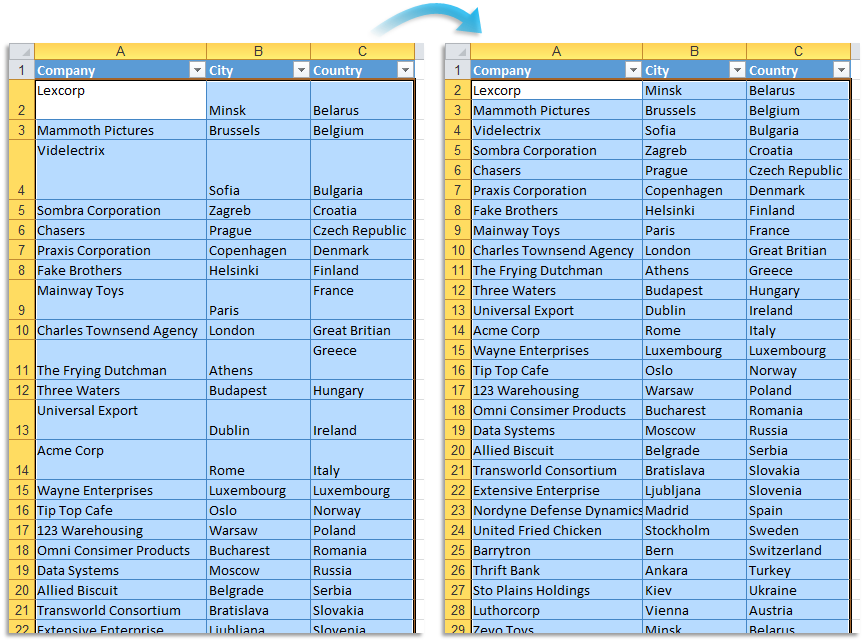
This tool removes trailing line breaks at the end of each value in your selected cells.
These line breaks are often inserted by pressing Alt+Enter in Excel or appear when data is imported from other programs.
It removes line break characters such as CHAR(10) (line feed), CHAR(13) (carriage return), or combinations like CR+LF, but only if they appear at the end of the cell content.
This is especially useful when cells end with invisible line breaks that affect formatting, printing, or lookups (such as VLOOKUP or XLOOKUP).
Cells with formulas are left unchanged.
Note:
If you want to remove or replace all line breaks (not just at the end), you can use our "Remove or Replace Unwanted Characters..." tool.
Starting this tool
Specify a Keyboard Shortcut: ASAP Utilities › My Tools & Shortcuts › Manage My Tools & Shortcuts...
Additional keywords to help you find this tool:
Remove trailing line break, Delete line break at end of cell, Remove Alt+Enter, Clean up line breaks, Remove carriage return at end of cell, Remove invisible characters, Fix lookup not working because of line breaks, Clean data line breaks, Delete final line break in Excel, Remove extra lines at end of text, Cell ends with line break, Trailing newline
Tip:Alt+P for the previous tool.
Tip: Alt+N for the next tool.

Save Time in Excel. The Easy Way.
ASAP Utilities helps you save time and do what Excel alone can't.
You can get started right away. No training needed.
Most users start with a few tools. Many end up using ASAP Utilities daily.
Used by teams in 28,500+ organizations.
Get Started with ASAP Utilities
Start saving time in Excel with practical tools you can use right away.
-
No sign-up required.
-
-
Free 90-day trial