


Find and Remove External References (Data Links) in Formulas...
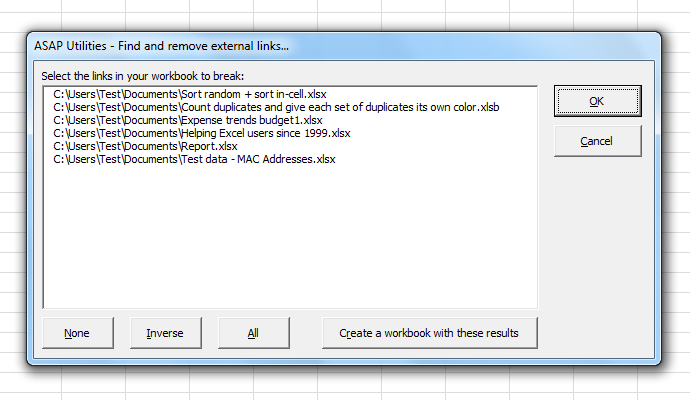
This tool helps you find and remove external references (also called data links or workbook links) in your workbook's formulas.
External references are formulas that refer to other workbooks. For example:
='C:\Sales\[Q1.xlsx]Sheet1'!A1
These links can slow down your workbook, create dependencies on other files, or cause broken links when the source file is moved or deleted.
With this tool, you can:
- See a list of all found external references (data links) used in formulas
-
Choose which links to remove
- Formulas that use the link will be replaced with their current calculated value
- Formulas that use a name (defined name) referring to that link will also be replaced with their current value
- Any name (defined name) that referred to the removed link will automatically be deleted
- Create a report of all found links for documentation or review
It's useful when:
- You want to remove unwanted or broken links to other workbooks
- You no longer need live links to external data
- You want to clean up your file before sharing
- You want to improve performance by removing unnecessary links
Important notes:
- This tool only finds links used in formulas (including names with links used in formulas).
- Links in other locations, such as charts, shapes, defined names not used in formulas, or conditional formatting, are not detected, due to limitations in Excel's VBA object model.
Comparison with Excel's built-in Break Links feature:
This tool works somewhat similarly to Excel's:
Data > Queries and Connections > Workbook Links > Break Links (Excel 365)
However, Excel's Break Links feature can leave behind names (defined names) that still refer to =#REF! after breaking the links.
This tool automatically removes any defined names that referred to a removed link, helping to avoid leftover broken names and keeping your workbook cleaner.
Starting this tool
Specify a Keyboard Shortcut: ASAP Utilities › My Tools & Shortcuts › Manage My Tools & Shortcuts...
Additional keywords to help you find this tool:
external links, external references, workbook links, data links, break links, remove links, delete links, remove external formulas, break external references, remove workbook links, remove data links, find external links, clean workbook links, fix broken links, unlink workbook, break data connections, remove links from formulas, replace links with values, external reference cleanup, Excel links manager
Tip:Alt+P for the previous tool.
Tip: Alt+N for the next tool.

Save Time in Excel. The Easy Way.
ASAP Utilities helps you save time and do what Excel alone can't.
You can get started right away. No training needed.
Most users start with a few tools. Many end up using ASAP Utilities daily.
Used by teams in 28,500+ organizations.
Get Started with ASAP Utilities
Start saving time in Excel with practical tools you can use right away.
-
No sign-up required.
-
-
Free 90-day trial