


Delete All Hidden Rows, Columns, or Both...
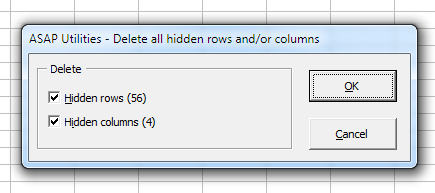
This tool removes all hidden rows, hidden columns, or both from your current worksheet, making it easy to clean up your file before sharing or distributing it.
For example, when you filter data in Excel, hidden rows and columns can clutter your worksheet or cause confusion. By deleting them, you keep only the visible, relevant data.
Please note: If your worksheet contains formulas with cell references to cells in the hidden rows or columns, update those formulas or replace them with their calculated results before using this tool. Otherwise, the formulas may return error values (#REF!) once the hidden rows and columns are removed.
Starting this tool
Specify a Keyboard Shortcut: ASAP Utilities › My Tools & Shortcuts › Manage My Tools & Shortcuts...
Additional keywords to help you find this tool:
Delete hidden rows in Excel, Delete hidden columns in Excel, Remove hidden rows and columns, Delete all hidden rows and columns, Clean up hidden data in Excel, Remove filtered rows and columns, Delete non-visible rows, Remove hidden cells in worksheet, Delete rows not shown in Excel, Remove autofiltered-out rows and columns, Clean up worksheet hidden rows columns
Tip:Alt+P for the previous tool.
Tip: Alt+N for the next tool.

Save Time in Excel. The Easy Way.
ASAP Utilities helps you save time and do what Excel alone can't.
You can get started right away. No training needed.
Most users start with a few tools. Many end up using ASAP Utilities daily.
Used by teams in 28,500+ organizations.
Get Started with ASAP Utilities
Start saving time in Excel with practical tools you can use right away.
-
No sign-up required.
-
-
Free 90-day trial