


Remove Accents from Letters (e.g., é → e, ñ → n)...
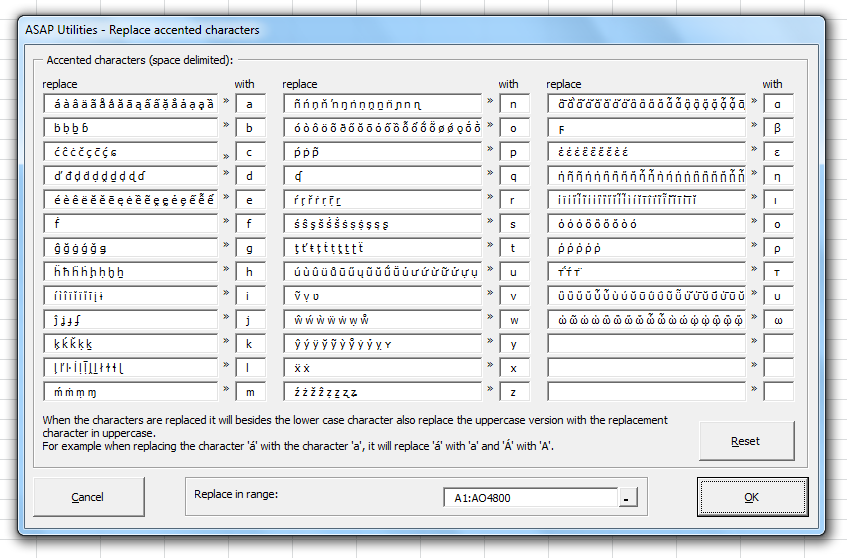
This tool replaces accented letters and special alphabet characters in your selected cells with their plain, unaccented versions.
It works on uppercase and lowercase letters, including accented vowels and consonants, characters with diacritics (such as dots, tilde, grave, acute, and circumflex accents), and special Greek variants. The tool replaces them with standard A-Z characters while preserving the correct letter case.
For example:
- "é" becomes "e"
- "ñ" becomes "n"
- "Ä" becomes "A"
- "áàâãåā" all become "a"
- "Ç" becomes "C"
- "ü" becomes "u"
- "ὠ" becomes "ω"
You can:
- Review and customize the replacement table if needed.
- Reset to the default replacements anytime.
- Process plain values and formulas.
This is helpful when:
- Standardizing text from different languages.
- Cleaning up imported data.
- Removing accents to improve sorting, filtering, or compatibility with systems that only support basic ASCII characters.
Your last used settings are remembered automatically.
Starting this tool
Specify a Keyboard Shortcut: ASAP Utilities › My Tools & Shortcuts › Manage My Tools & Shortcuts...
Additional keywords to help you find this tool:
Remove accents from letters, Replace accented characters, Strip diacritical marks in Excel, Convert é to e in Excel, Remove special characters from text, Normalize accented letters, Replace foreign characters, Remove accent marks, Replace ñ with n, Remove diacritics, Clean up accented text, Convert accented text to plain text, Remove non-ASCII characters, Unaccent text, Remove stroke letters, Replace non-English letters, Remove diacritical signs, Convert UTF-8 accented characters, Remove French/Spanish/German accents
Tip:Alt+P for the previous tool.
Tip: Alt+N for the next tool.

Save Time in Excel. The Easy Way.
ASAP Utilities helps you save time and do what Excel alone can't.
You can get started right away. No training needed.
Most users start with a few tools. Many end up using ASAP Utilities daily.
Used by teams in 28,500+ organizations.
Get Started with ASAP Utilities
Start saving time in Excel with practical tools you can use right away.
-
No sign-up required.
-
-
Free 90-day trial