


Insert Workbook's File Path and Name in Header, Footer or Cell...
This tool lets you insert the current workbook's folder path and file name into the selected cells or the worksheet's header or footer.
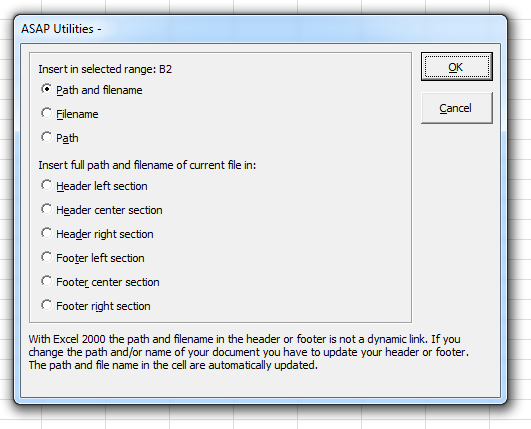
You can insert into selected cells:
- Path and filename (e.g., C:\Documents\Report.xlsx)
- Filename only (e.g., Report.xlsx)
- Path only (e.g., C:\Documents)
Or insert the full path and filename into the sheet's header or footer:
- Header left section
- Header center section
- Header right section
- Footer left section
- Footer center section
- Footer right section
The inserted path and filename are dynamic and update automatically when the workbook is renamed or moved.
Tip: This tool provides a quick alternative to Excel's built-in Page Setup options, to insert &[Path]&[File] for the file path and name in headers or footers.
It also saves you from having to figure out how to extract the file path and/or name using Excel's CELL, FIND, ISERROR, MID, and LEFT functions in a complicated formula.
Starting this tool
Specify a Keyboard Shortcut: ASAP Utilities › My Tools & Shortcuts › Manage My Tools & Shortcuts...
Additional keywords to help you find this tool:
Insert file path in Excel, Insert file name in Excel cell, Insert workbook name in header, Show file name and path, Dynamic file path in footer, Insert full path and filename in cell, Display file name in spreadsheet, Header file name path, Insert workbook path in cell, Insert current file name, Show current workbook path in Excel, Display filename in worksheet, Insert dynamic file name, Formula for file path and name, CELL formula for file name, Insert file name using Excel formula, Display document path in Excel, Automatically update file path in worksheet
Tip:Alt+P for the previous tool.
Tip: Alt+N for the next tool.

Save Time in Excel. The Easy Way.
ASAP Utilities helps you save time and do what Excel alone can't.
You can get started right away. No training needed.
Most users start with a few tools. Many end up using ASAP Utilities daily.
Used by teams in 28,500+ organizations.
Get Started with ASAP Utilities
Start saving time in Excel with practical tools you can use right away.
-
No sign-up required.
-
-
Free 90-day trial