


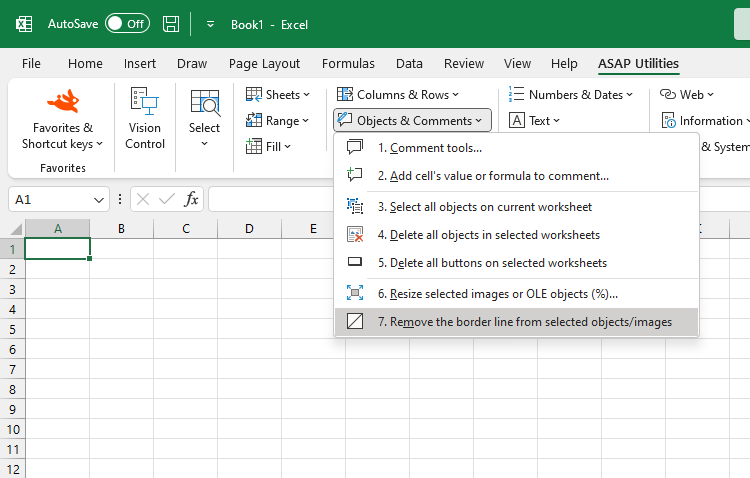
Remove Border Line from Selected Shapes and Pictures
This tool removes the outer border line (outline) from all selected shapes and pictures.
It works on all shape-based objects in your selection, including:
- Pictures
- AutoShapes
- Text boxes
- WordArt
- Form controls (from the Forms toolbar)
- OLE objects that are shape-based
Instead of removing borders one object at a time, this tool makes it easy to clear the outlines from multiple objects at once without opening the Format Picture pane in Excel.
This is useful for cleaning up layouts, removing default outlines from inserted objects, or preparing visuals for printing and presentations.
Tip:
You can use our "Select All Objects" tool to quickly select everything on your worksheet before removing the borders.
Starting this tool
Specify a Keyboard Shortcut: ASAP Utilities › My Tools & Shortcuts › Manage My Tools & Shortcuts...
Additional keywords to help you find this tool:
Remove borders from pictures in Excel, Remove outline from shape, Delete picture border, Remove borders from text boxes Excel, Clear borders from selected objects, Remove border line from images, Remove shape outline, Remove picture frame, Hide borders around images, Remove formatting borders, Remove shape border color, Remove object borders, Remove WordArt outlines, Delete borders from embedded images, No outline multiple shapes, Remove outlines from shapes, Remove border from picture, Delete picture borders Excel
Tip:Alt+P for the previous tool.
Tip: Alt+N for the next tool.

Save Time in Excel. The Easy Way.
ASAP Utilities helps you save time and do what Excel alone can't.
You can get started right away. No training needed.
Most users start with a few tools. Many end up using ASAP Utilities daily.
Used by teams in 28,500+ organizations.
Get Started with ASAP Utilities
Start saving time in Excel with practical tools you can use right away.
-
No sign-up required.
-
-
Free 90-day trial