


Resize Excel Window to Standard Screen Sizes...
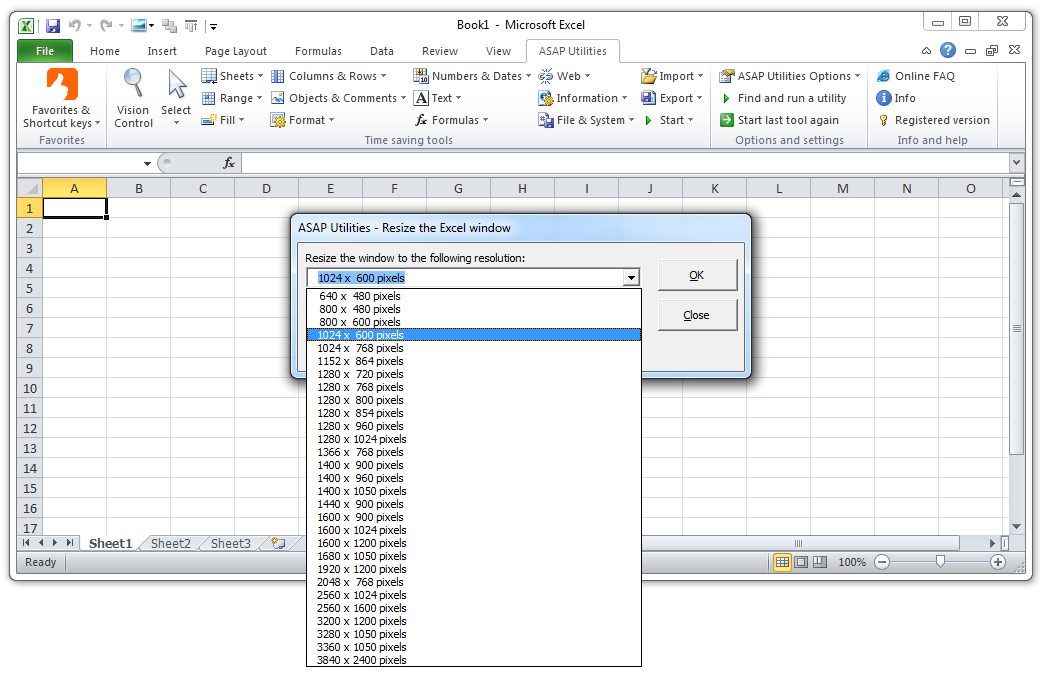
This tool resizes the Excel window to a specific screen size you choose.
It's useful when:
- Testing how your workbook, dashboard, or application looks at different screen sizes
- Creating designs or reports optimized for smaller or larger screens
- Working on Excel-based tools or templates that need to fit within a certain screen resolution
How it works:
- Choose from a list of standard screen sizes
- The Excel window is resized exactly to match that screen size
-
Optional settings to:
- Reserve space for the Windows taskbar
- Center the Excel window on your screen
You can choose from many common screen sizes, such as:
- 1024 x 768 pixels
- 1366 x 768 pixels
- 1920 x 1080 pixels (Full HD)
- 2560 x 1440 pixels (QHD)
-
3840 x 2160 pixels (4K Ultra HD)
...and many more, up to 6144 x 3160 pixels.
Important to know:
- The window size is limited by your current screen resolution.
Starting this tool
Specify a Keyboard Shortcut: ASAP Utilities › My Tools & Shortcuts › Manage My Tools & Shortcuts...
Additional keywords to help you find this tool:
resize window, screen resolution tester, simulate screen size, change Excel window size, standard display resolution, fit Excel to screen, test layout at resolution, set Excel window to 1920x1080, adjust Excel window size, common screen sizes, pixel resolution, responsive design testing, preview in different resolutions, Excel layout preview, simulate user screen, test Excel app appearance, resize for presentation, window size presets, UX testing in Excel, Excel development tools
Tip:Alt+P for the previous tool.
Tip: Alt+N for the next tool.

Save Time in Excel. The Easy Way.
ASAP Utilities helps you save time and do what Excel alone can't.
You can get started right away. No training needed.
Most users start with a few tools. Many end up using ASAP Utilities daily.
Used by teams in 28,500+ organizations.
Get Started with ASAP Utilities
Start saving time in Excel with practical tools you can use right away.
-
No sign-up required.
-
-
Free 90-day trial