


Insert Current Date and Time with Seconds
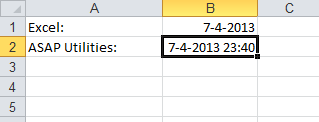
This tool inserts the current system date and time, including seconds, into the active cell.
It works like Excel's built-in shortcut (Ctrl+;) but also includes the seconds for more precise time tracking.
For example: 2025-04-08 14:35:42
This is useful when you need an exact, unchanging timestamp for:
- Logging data entry or approvals.
- Tracking edits or updates.
- Creating time-based records for audits or reports.
Unlike Excel's NOW() function, which updates every time the worksheet recalculates, this tool inserts a fixed value. That means the date and time stay exactly as entered, which is ideal for accurate time logging or documentation.
By default, you can launch this tool using the Control+Shift+D shortcut.
Starting this tool
Specify a Keyboard Shortcut: ASAP Utilities › My Tools & Shortcuts › Manage My Tools & Shortcuts...
Additional keywords to help you find this tool:
Add timestamp with seconds, Insert static date and time, Timestamp seconds precision, Insert full timestamp, Insert current time with seconds, Static date and time, Add current datetime to cell, Insert precise time in Excel, Auto insert time and date, Shortcut for timestamp with seconds, Fill cell with datetime, Datetime accuracy, Log exact timestamp
Tip:Alt+P for the previous tool.
Tip: Alt+N for the next tool.

Save Time in Excel. The Easy Way.
ASAP Utilities helps you save time and do what Excel alone can't.
You can get started right away. No training needed.
Most users start with a few tools. Many end up using ASAP Utilities daily.
Used by teams in 28,500+ organizations.
Get Started with ASAP Utilities
Start saving time in Excel with practical tools you can use right away.
-
No sign-up required.
-
-
Free 90-day trial