


Fix Autofit Row Height with Merged Cells and Hidden Columns
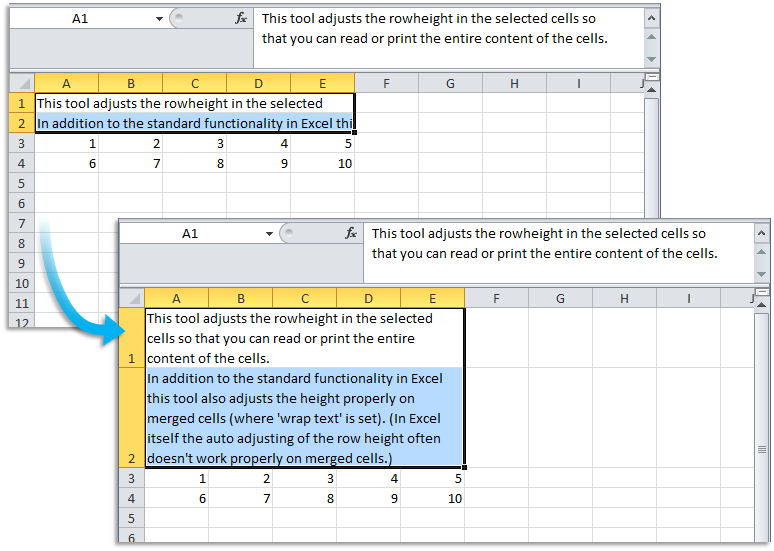
This tool fixes the row height in your selected cells so the full content is visible for reading or printing, even when merged cells are used.
Compared to Excel's built-in AutoFit Row Height, this tool:
- Works on merged cells with wrap text enabled (Excel often fails to adjust these correctly)
- Ignores hidden columns when calculating row height, so only visible content is used
Excel's AutoFit does not work with merged cells and includes values from hidden columns when calculating the row height, which can result in rows that are too short or unnecessarily tall.
This tool avoids those issues by correctly adjusting the height for merged cells and basing it only on the content in visible cells, giving you cleaner and more accurate layouts.
Note:
Like Excel's AutoFit, this tool does not update row height automatically when content changes.
If you edit the cell contents later, run the tool again to update the height.
Starting this tool
Specify a Keyboard Shortcut: ASAP Utilities › My Tools & Shortcuts › Manage My Tools & Shortcuts...
Additional keywords to help you find this tool:
autofit row height, fix row height Excel, merged cells row height, Excel autofit not working, adjust row height, Excel wrap text row height, autofit merged cells, ignore hidden columns, Excel row height problem, fix wrapped text height, adjust merged cell row height
Tip:Alt+P for the previous tool.
Tip: Alt+N for the next tool.

Save Time in Excel. The Easy Way.
ASAP Utilities helps you save time and do what Excel alone can't.
You can get started right away. No training needed.
Most users start with a few tools. Many end up using ASAP Utilities daily.
Used by teams in 28,500+ organizations.
Get Started with ASAP Utilities
Start saving time in Excel with practical tools you can use right away.
-
No sign-up required.
-
-
Free 90-day trial