


Replace Named Ranges in Formulas with Cell References
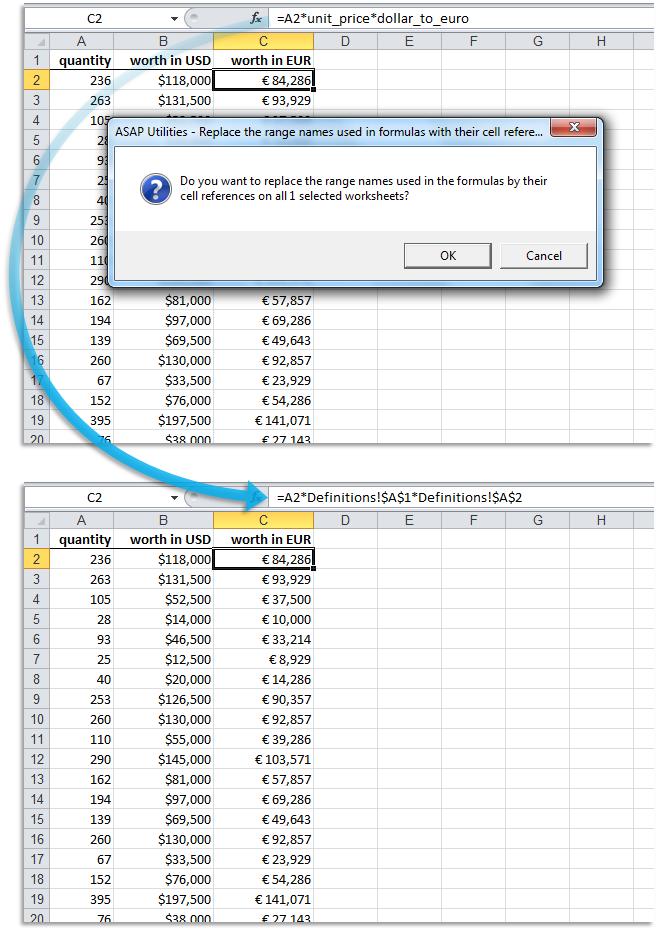
This tool replaces named ranges in cell formulas with their actual cell references on the selected worksheets.
For example:
- If cell C10 is named quantity and a formula contains =A1*quantity, it becomes =A1*C10.
- If the named range refers to another sheet (e.g., 'Input Values'!C10), the sheet name will be included in the formula: =A1*'Input Values'!C10.
This is helpful when simplifying formulas, auditing spreadsheets by making references more transparent, or preparing files for users unfamiliar with named ranges.
Some teams and organizations prefer or require raw cell references for documentation, validation, or archiving.
Starting this tool
Specify a Keyboard Shortcut: ASAP Utilities › My Tools & Shortcuts › Manage My Tools & Shortcuts...
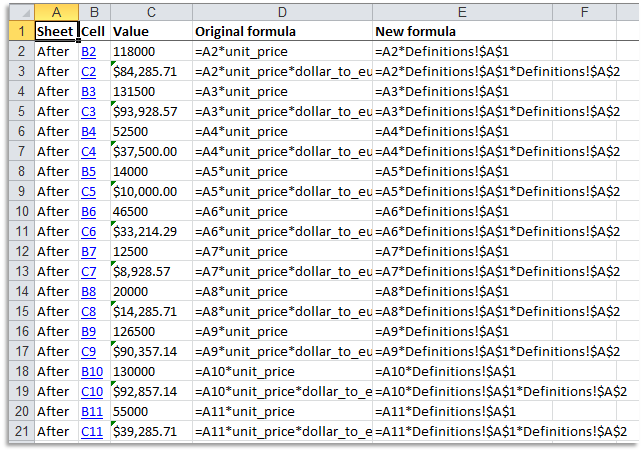
Example screenshot: 2 A report with the changes that were made (Here's the English version.)
Additional keywords to help you find this tool:
convert named ranges, replace named ranges, remove named ranges in formulas, convert names to cell addresses, replace name with reference, Excel formulas raw references, simplify Excel formulas, validation-friendly formulas, documentation-friendly formulas, replace name with cell location, formula conversion
Tip:Alt+P for the previous tool.
Tip: Alt+N for the next tool.

Save Time in Excel. The Easy Way.
ASAP Utilities helps you save time and do what Excel alone can't.
You can get started right away. No training needed.
Most users start with a few tools. Many end up using ASAP Utilities daily.
Used by teams in 28,500+ organizations.
Get Started with ASAP Utilities
Start saving time in Excel with practical tools you can use right away.
-
No sign-up required.
-
-
Free 90-day trial