


List All Formulas Used in Workbook
This tool creates a detailed overview of all formulas used across the worksheets in your workbook.
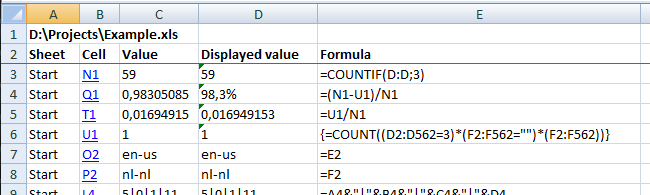
For each formula, the report shows:
- Sheet: The worksheet where the formula is located.
- Cell: The cell address containing the formula (clickable hyperlink to jump to the cell)
- Value: The formula's calculated result
- Displayed value: How the result appears in the cell, based on its number format
- Formula: The actual formula text used in the cell
This is useful for:
- Auditing your workbook
- Reviewing or documenting formulas
- Finding and analyzing external references (e.g., formulas that link to other files)
- Spotting inconsistencies or outdated formulas
The report is generated in a new workbook, so you can save, sort, or filter the information without affecting your original file.
Starting this tool
Specify a Keyboard Shortcut: ASAP Utilities › My Tools & Shortcuts › Manage My Tools & Shortcuts...
Additional keywords to help you find this tool:
formula audit, formula listing tool, Excel formula summary, cell formula extractor, document Excel formulas, Excel formula tracking, external links in formulas, identify workbook links, Excel formula mapping, list linked formulas, trace formulas to sheets, formula checker, Excel report formulas, workbook formula viewer
Tip:Alt+P for the previous tool.
Tip: Alt+N for the next tool.

Save Time in Excel. The Easy Way.
ASAP Utilities helps you save time and do what Excel alone can't.
You can get started right away. No training needed.
Most users start with a few tools. Many end up using ASAP Utilities daily.
Used by teams in 28,500+ organizations.
Get Started with ASAP Utilities
Start saving time in Excel with practical tools you can use right away.
-
No sign-up required.
-
-
Free 90-day trial