


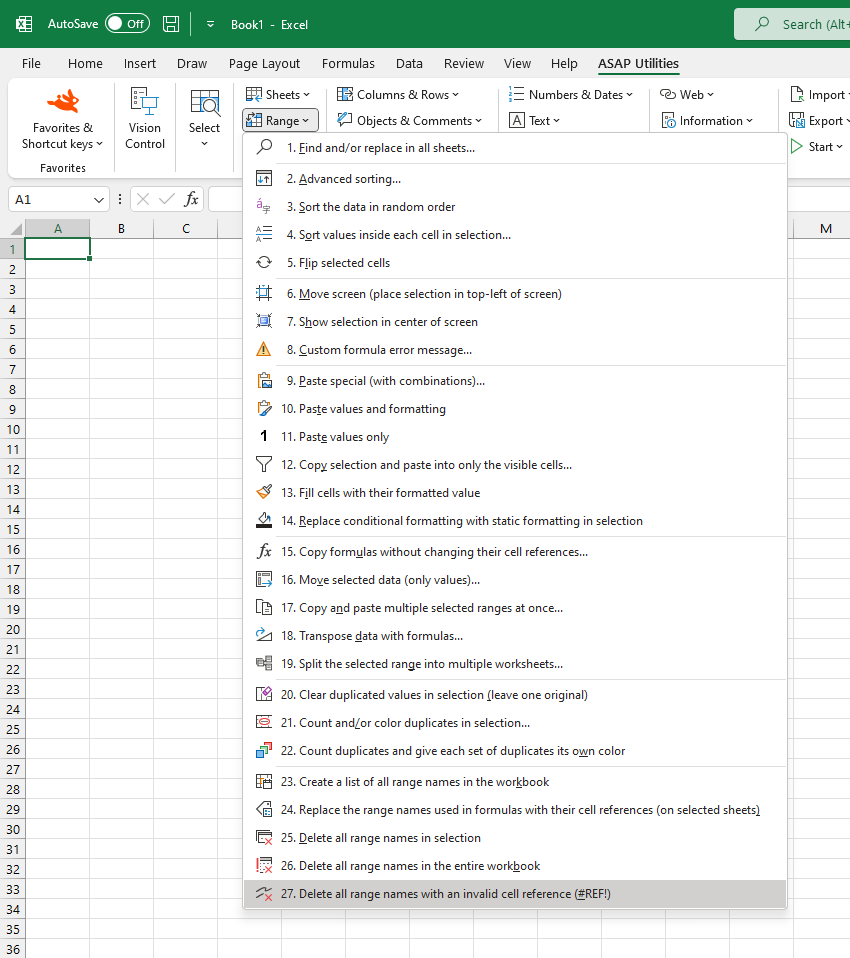
Delete Named Ranges with Invalid Cell References (#REF!)
This tool deletes all named ranges in your workbook with invalid cell references (#REF!).
Such broken references often occur when the referenced cells, rows, or worksheets have been deleted or renamed.
After the cleanup, a summary report, created in a new workbook, lists all the named ranges that were deleted.
Note:
Only the invalid names are removed. Your actual cell data and formulas remain unchanged.
Starting this tool
Specify a Keyboard Shortcut: ASAP Utilities › My Tools & Shortcuts › Manage My Tools & Shortcuts...
Additional keywords to help you find this tool:
delete invalid named ranges, remove broken named ranges, #REF! error, Excel name manager cleanup, Excel remove invalid names, delete broken references, invalid name definition, Excel cleanup name manager, remove bad named range, fix #REF! in names, name manager #REF! error, delete name reference error, remove #REF! from name manager, named range points to deleted cell
Tip:Alt+P for the previous tool.
Tip: Alt+N for the next tool.

Save Time in Excel. The Easy Way.
ASAP Utilities helps you save time and do what Excel alone can't.
You can get started right away. No training needed.
Most users start with a few tools. Many end up using ASAP Utilities daily.
Used by teams in 28,500+ organizations.
Get Started with ASAP Utilities
Start saving time in Excel with practical tools you can use right away.
-
No sign-up required.
-
-
Free 90-day trial