


Remove All HTML Tags in Selected Cells...
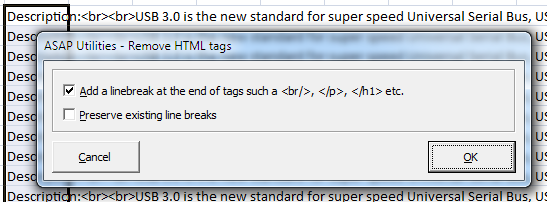
This tool removes all HTML tags from the selected cells, such as <br>, <p>, <font>, <script>, and more.
Besides removing the tags, you can choose to:
- Add a line break after removing block-level tags like <br>, <br />, </p>, </h1>
- Preserve existing line breaks in the cell content
It also decodes encoded characters such as (non-breaking space), & (&), and %20 (space) to make the text easier to read.
Examples of use:
- Clean up product or stock descriptions exported from an e-commerce platform.
- Remove formatting tags from CMS or database exports before importing into Excel.
- Prepare raw HTML content for plain-text use in reports, CSV files, or summaries.
Starting this tool
Specify a Keyboard Shortcut: ASAP Utilities › My Tools & Shortcuts › Manage My Tools & Shortcuts...
Additional keywords to help you find this tool:
html cleanup, remove html formatting, clean html text, strip tags from Excel, convert html to plain text, clean product descriptions, remove br tag, strip script tag, clean CMS export, decode html entities, decode ampersand, remove font tag, remove p tag, decode %20
Tip:Alt+P for the previous tool.
Tip: Alt+N for the next tool.

Save Time in Excel. The Easy Way.
ASAP Utilities helps you save time and do what Excel alone can't.
You can get started right away. No training needed.
Most users start with a few tools. Many end up using ASAP Utilities daily.
Used by teams in 28,500+ organizations.
Get Started with ASAP Utilities
Start saving time in Excel with practical tools you can use right away.
-
No sign-up required.
-
-
Free 90-day trial