


Sort Values Inside Each Cell...
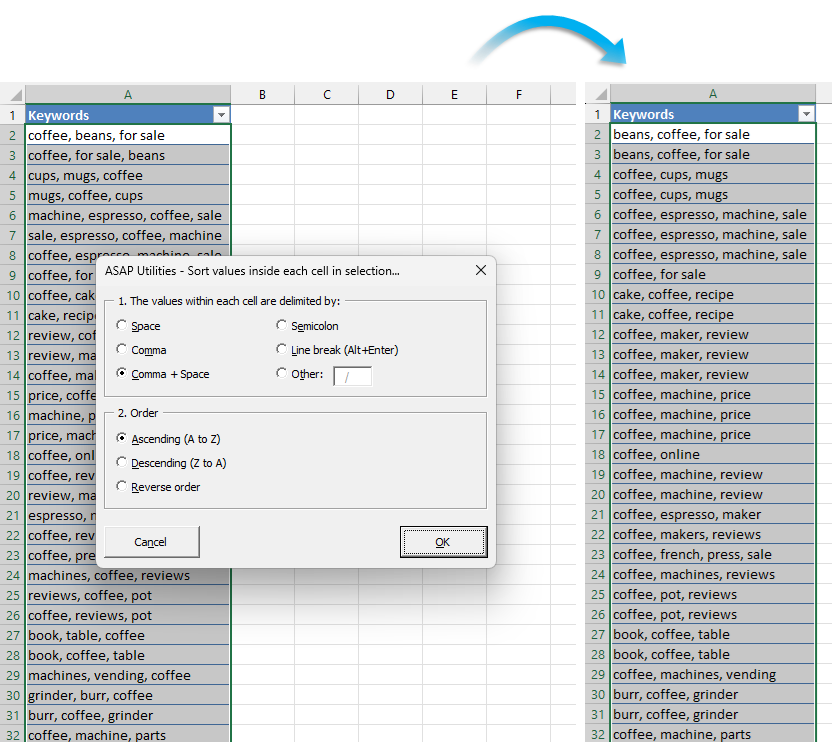
This tool sorts the values within each selected cell, based on your chosen separator.
You can sort:
- Alphabetically (A-Z)
- Reverse alphabetically (Z-A)
- Or reverse the current order
Supported separators:
- Space
- Comma
- Comma + space
- Semicolon
- Line break (Alt+Enter)
- Or a custom character of your choice
Examples:
- "Orange, Apple, Banana" → "Apple, Banana, Orange" (A-Z)
- "Q1;Q3;Q2" → "Q3;Q2;Q1" (Z-A)
- "Red Blue Green" → "Green Blue Red" (reverse order)
Sorting values inside a single cell helps:
- Clean up unordered lists (tags, categories, names, etc.)
- Standardize data for duplicate checking or comparison
- Prepare cells for lookups or matching
- Improve readability in exports or forms
- Create consistent input formats (e.g., skills, allergens, roles)
You can also use this in a temporary helper column to make it easier to find duplicates when the same values are listed in a different order.
Example: "Excel, PowerPoint" and "PowerPoint, Excel" are both sorted as "Excel, PowerPoint", so they can be matched more easily.
Starting this tool
Click › Range › 4. Sort Values Inside Each Cell...
Specify a Keyboard Shortcut: ASAP Utilities › My Tools & Shortcuts › Manage My Tools & Shortcuts...
Additional keywords to help you find this tool:
Sort values in a single cell, Sort comma-separated values, Sort words inside a cell, Sort text in cell by comma, Reverse word order in cell, Sort items inside a cell, Sort space-separated values, Alphabetize words in cell, Sort semicolon-separated values, Cell content sorter, Sort line break separated values, Sort delimited text, Reverse text list in cell, Reorder values inside cell, Sort or reverse order of words in cell
Tip:Alt+P for the previous tool.
Tip: Alt+N for the next tool.

Save Time in Excel. The Easy Way.
ASAP Utilities helps you save time and do what Excel alone can't.
You can get started right away. No training needed.
Most users start with a few tools. Many end up using ASAP Utilities daily.
Used by teams in 28,500+ organizations.
Get Started with ASAP Utilities
Start saving time in Excel with practical tools you can use right away.
-
No sign-up required.
-
-
Free 90-day trial