


Change Text Case with Multiple Capitalization Options...
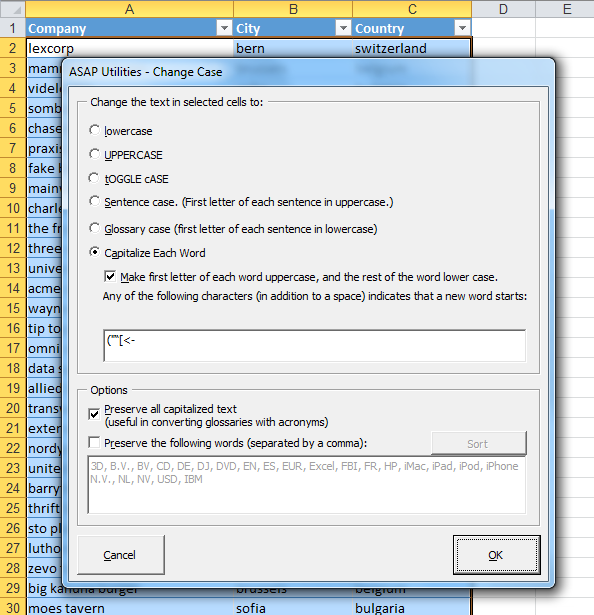
This tool changes the text in your selected cells to uppercase, lowercase, or other common capitalization styles.
It works on both plain values and formulas.
You can choose from the following case styles:
- lowercase - changes all letters to lowercase
- UPPERCASE - changes all letters to uppercase
- tOGGLE cASE - switches uppercase to lowercase and vice versa
- Sentence case - capitalizes the first letter of each sentence
- Glossary case - makes the first letter of each sentence lowercase
-
Capitalize Each Word - capitalizes the first letter of each word and makes the rest lowercase
You can optionally define which characters (besides a space) start a new word, such as hyphens or slashes
Options:
- Preserve all capitalized text - useful when converting glossaries or datasets that include acronyms (e.g., "SKU" stays "SKU")
- Set words to exclude from conversion - skip specific product codes or terms (e.g., "VAT", "PowerPoint", or "Excel") that should keep their original capitalization
Examples:
- lowercase: "Customer Name" → "customer name"
- UPPERCASE: "Customer Name" → "CUSTOMER NAME"
- tOGGLE cASE: "Customer Name" → "cUSTOMER nAME"
- Sentence case: "order received. payment pending." → "Order received. Payment pending."
- Glossary case: "Order Received. Payment Pending." → "order Received. payment Pending."
- Capitalize Each Word: "customer name" → "Customer Name"
This tool is helpful when cleaning up imported data, standardizing text formatting, or preparing consistent labels, glossary terms, or text used in reports.
Starting this tool
Specify a Keyboard Shortcut: ASAP Utilities › My Tools & Shortcuts › Manage My Tools & Shortcuts...
Additional keywords to help you find this tool:
Change text case in Excel, Change capitalization style, Change sentence case, Toggle case, Title case formatting, Convert text to proper case, Change all caps to lowercase, Fix capitalization in Excel, Capitalize first letter of each word, Bulk text case conversion, Glossary capitalization tool, Excel uppercase lowercase tool, Standardize text formatting, Change text to title case, Capitalize sentences, Convert Excel data to consistent case, Case converter, Batch change text capitalization, Change all text to uppercase lowercase or proper case in Excel
Tip:Alt+P for the previous tool.
Tip: Alt+N for the next tool.

Save Time in Excel. The Easy Way.
ASAP Utilities helps you save time and do what Excel alone can't.
You can get started right away. No training needed.
Most users start with a few tools. Many end up using ASAP Utilities daily.
Used by teams in 28,500+ organizations.
Get Started with ASAP Utilities
Start saving time in Excel with practical tools you can use right away.
-
No sign-up required.
-
-
Free 90-day trial