


Copy Visible Cells and Paste to Visible Cells in Target Range...
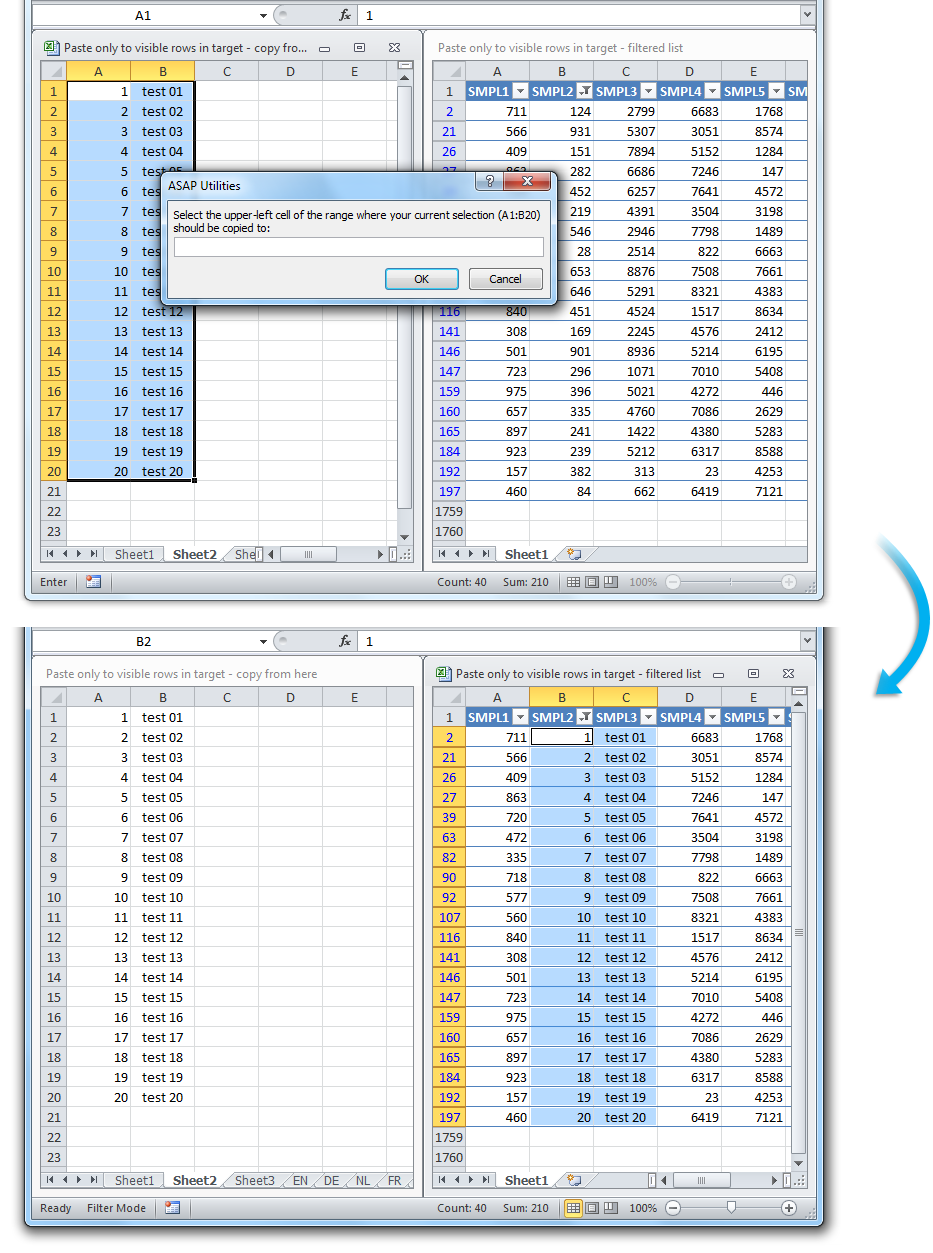
This tool copies only the visible cells from your current selection and pastes them into the visible cells of a target range.
It works similarly to Excel's standard copy and paste: everything in each visible cell is copied (values, formatting, formulas, comments, etc.). The difference is that this tool automatically skips hidden rows and columns in both the source and the destination. The content is pasted one cell at a time into the next visible cells in the target range.
When the tool starts, you can select the first cell of the destination range. The address of your current selection is shown in the dialog for reference.
This is helpful when:
- You want to paste into a filtered list without affecting hidden rows.
- Your sheet includes grouped or hidden rows or columns.
- Excel's default paste doesn't work as expected with filtered data.
Starting this tool
Specify a Keyboard Shortcut: ASAP Utilities › My Tools & Shortcuts › Manage My Tools & Shortcuts...
Additional keywords to help you find this tool:
copy visible cells only, paste into visible cells, paste to filtered rows only, Excel copy skip hidden rows, paste into filtered list, paste without affecting hidden rows, copy and paste visible cells, copy skip hidden rows and columns, Excel paste filtered range, paste data into visible cells, copy filtered data to visible cells, Excel copy paste visible only, copy to visible cells in target range
Tip:Alt+P for the previous tool.
Tip: Alt+N for the next tool.

Save Time in Excel. The Easy Way.
ASAP Utilities helps you save time and do what Excel alone can't.
You can get started right away. No training needed.
Most users start with a few tools. Many end up using ASAP Utilities daily.
Used by teams in 28,500+ organizations.
Get Started with ASAP Utilities
Start saving time in Excel with practical tools you can use right away.
-
No sign-up required.
-
-
Free 90-day trial