


Subscript Numbers in Chemical Formulas
This tool applies subscript formatting to the numbers in chemical formulas in your selected text cells.
It automatically detects where the numbers should be subscripted based on standard chemical notation.
This includes element counts (e.g., H₂O), numbers inside parentheses (e.g., NO₃)₃, and hydrate notations using dots (e.g., · 4H₂O).
All other formatting in the cell remains unchanged. Cells that contain formulas, numbers, or dates are skipped.
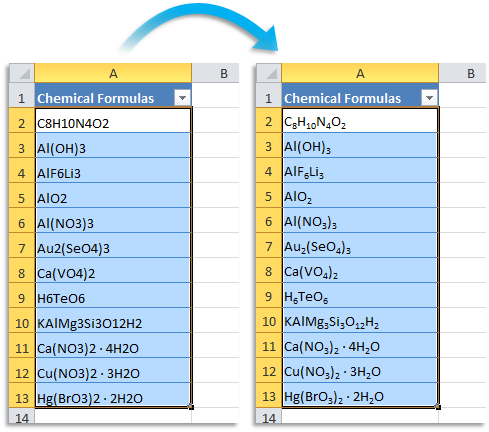
Examples where numbers are formatted as subscript:
- "H2O" becomes "H₂O" (Water)
- "C8H10N4O2" becomes "C₈H₁₀N₄O₂" (Caffeine)
- "C6H12O6" becomes "C₆H₁₂O₆" (Glucose)
- "Al(OH)3" becomes "Al(OH)₃" (Aluminum hydroxide)
- "Ca(NO3)2 · 4H2O" becomes "Ca(NO₃)₂ · 4H₂O" (Calcium nitrate tetrahydrate)
- "NaHCO3" becomes "NaHCO₃" (Baking soda)
Starting this tool
Specify a Keyboard Shortcut: ASAP Utilities › My Tools & Shortcuts › Manage My Tools & Shortcuts...
Additional keywords to help you find this tool:
Chemical formula formatting, Apply subscript to chemical formulas, Subscript numbers in molecules, Convert chemical formulas to subscript, Chemistry formatter, Subscript atoms or elements, Chemical notation formatting, Empirical formula formatting, Tool for molecular formulas, Structure formula formatting, Chemical symbols and subscripts, Formatting for chemistry reports, Format subscripts in scientific data, Chemical structure label formatter
Tip:Alt+P for the previous tool.
Tip: Alt+N for the next tool.

Save Time in Excel. The Easy Way.
ASAP Utilities helps you save time and do what Excel alone can't.
You can get started right away. No training needed.
Most users start with a few tools. Many end up using ASAP Utilities daily.
Used by teams in 28,500+ organizations.
Get Started with ASAP Utilities
Start saving time in Excel with practical tools you can use right away.
-
No sign-up required.
-
-
Free 90-day trial