


Move, Extend, or Shrink Range Selections...
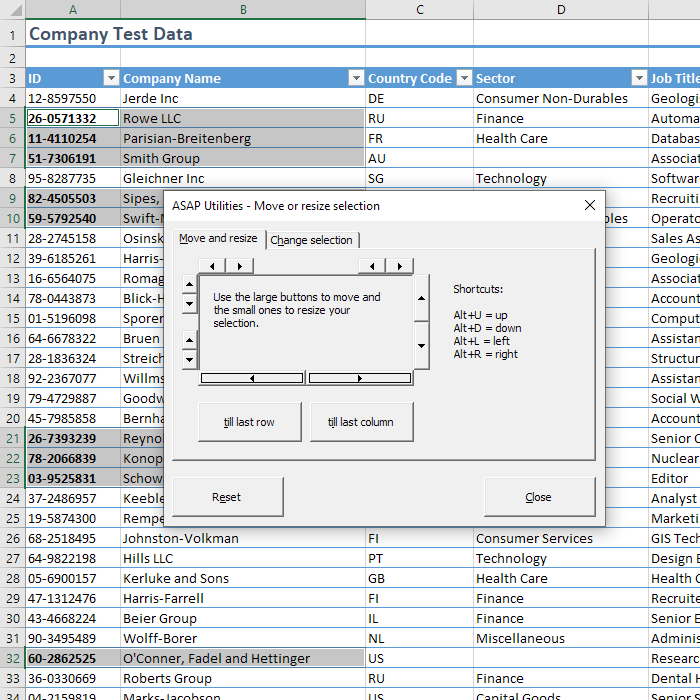
With this tool, you can quickly adjust your cell range selection in Excel without altering any data.
It allows you to move an entire range selection (for example, shifting A1:A10 to B1:B10) or to extend or shrink the selection from any edge (top, bottom, left, or right). You can even adjust non-contiguous range selections in any direction.
Use the small arrow buttons to shrink or extend the edges or the larger arrow buttons to move the entire selection. For even quicker adjustments, keyboard shortcuts are available: Alt+U (move up), Alt+D (move down), Alt+L (move left), and Alt+R (move right).
This tool is especially powerful when combined with features like the "Select cells based on content, formatting and more..." tool. For example, if you want to format cells in column B based on conditions in column A, first select the target cells in column A, then use this tool to shift the selection one column to the right, instantly selecting the corresponding cells in column B.
By default, you can launch this tool using the Control+Alt+M shortcut.
Starting this tool
Specify a Keyboard Shortcut: ASAP Utilities › My Tools & Shortcuts › Manage My Tools & Shortcuts...
Additional keywords to help you find this tool:
Excel move selection tool, Extend Excel cell range, Shrink Excel selection, Adjust cell range in Excel, Shift selection range, Resize selection in Excel, Excel range adjustment, Move and extend selection, Excel selection editor, Keyboard shortcuts for selection move, Non-contiguous selection adjustment, Arrow key selection tool, Excel selection management, Select row or column next to current selection
Tip:Alt+P for the previous tool.
Tip: Alt+N for the next tool.

Save Time in Excel. The Easy Way.
ASAP Utilities helps you save time and do what Excel alone can't.
You can get started right away. No training needed.
Most users start with a few tools. Many end up using ASAP Utilities daily.
Used by teams in 28,500+ organizations.
Get Started with ASAP Utilities
Start saving time in Excel with practical tools you can use right away.
-
No sign-up required.
-
-
Free 90-day trial