


Copy and Stack Rows or Columns from Multiple Sheets...
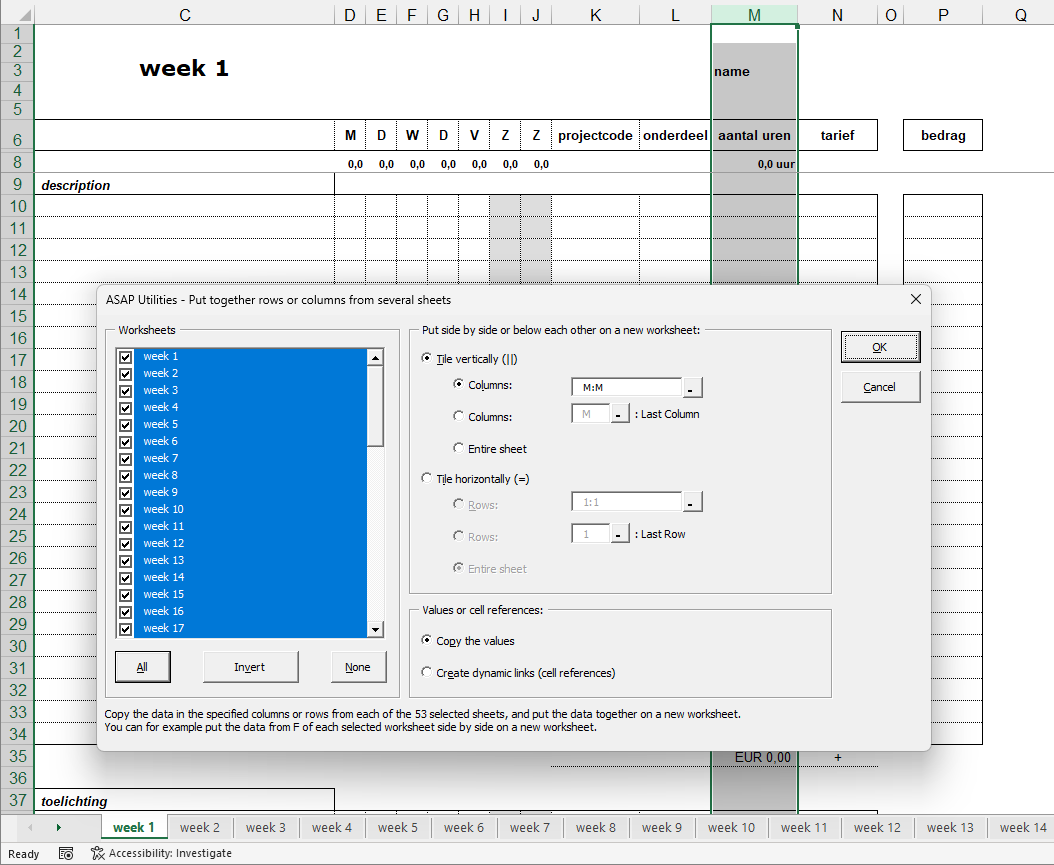
Easily copy and stack rows or columns from multiple worksheets into a new sheet, either side by side (columns) or below each other (rows).
You can choose to:
- Tile vertically - Select specific columns or copy the used range from each selected sheet.
- Tile horizontally - Select specific rows or copy the used range from each selected sheet.
- Copy values or Create dynamic links (cell references) to keep data automatically updated.
Note:
When using Create dynamic links, Excel's Paste Link method is used.
To avoid displaying zero values for references to empty cells, ASAP Utilities turns off Excel's 'Show a zero in cells that have a zero value' setting under 'Display options for this worksheet' for the new sheet.
You can adjust this setting there or use the 'Display & Navigation' tool in ASAP Utilities.
Starting this tool
Specify a Keyboard Shortcut: ASAP Utilities › My Tools & Shortcuts › Manage My Tools & Shortcuts...
Additional keywords to help you find this tool:
Copy rows from multiple sheets in ExcelStack columns from multiple worksheetsCopy data from multiple sheets to one sheetCombine rows from multiple sheets into oneCopy used range from multiple worksheetsExcel stack data from different sheetsTransfer columns from multiple sheets to a new worksheetCopy data from different sheets to one master sheetExtract rows or columns from multiple worksheetsJoin data from multiple sheetsMerge data from multiple worksheets (not formulas)Consolidate rows and columns from multiple sheets (without calculations)What is the fastest way to extract data from multiple worksheets?
Tip:Alt+P for the previous tool.
Tip: Alt+N for the next tool.

Save Time in Excel. The Easy Way.
ASAP Utilities helps you save time and do what Excel alone can't.
You can get started right away. No training needed.
Most users start with a few tools. Many end up using ASAP Utilities daily.
Used by teams in 28,500+ organizations.
Get Started with ASAP Utilities
Start saving time in Excel with practical tools you can use right away.
-
No sign-up required.
-
-
Free 90-day trial