


Paste Special with Combined Options...
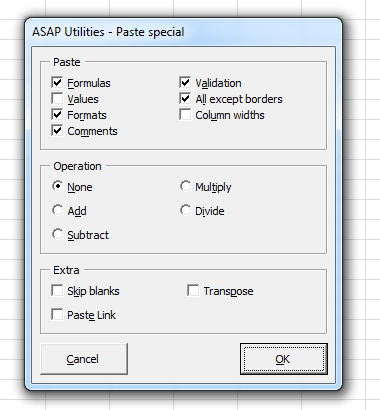
Quickly paste multiple properties at once, making it more flexible than Excel's built-in Paste Special.
With Excel's default Paste Special, you can only paste one type of data at a time, such as values, formats, or comments.
This tool allows you to combine multiple paste options, such as both values and formats, in a single step, saving time and effort.
How to use:
1. Copy your data range (e.g., with Ctrl+C).
2. Select the destination cell or range.
3. Run this tool to choose and apply multiple paste options at once.
By default, you can launch this tool using the Control+Alt+Y shortcut.
Starting this tool
Specify a Keyboard Shortcut: ASAP Utilities › My Tools & Shortcuts › Manage My Tools & Shortcuts...
Additional keywords to help you find this tool:
Excel paste special formulas and formats together, Paste values and formatting simultaneously, Paste special apply formatting and values, Paste special combine values and formats, Paste values and column widths, Paste special multiple selections, Excel paste special multiple options
Tip:Alt+P for the previous tool.
Tip: Alt+N for the next tool.

Save Time in Excel. The Easy Way.
ASAP Utilities helps you save time and do what Excel alone can't.
You can get started right away. No training needed.
Most users start with a few tools. Many end up using ASAP Utilities daily.
Used by teams in 28,500+ organizations.
Get Started with ASAP Utilities
Start saving time in Excel with practical tools you can use right away.
-
No sign-up required.
-
-
Free 90-day trial