


Replace Values with Their Formatted Value
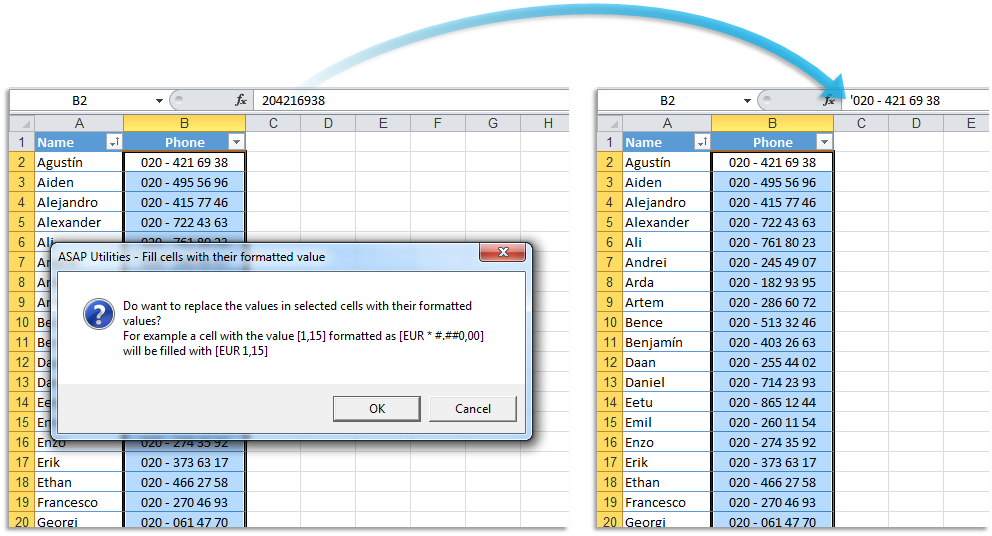
This tool replaces the actual values in the selected cells with their displayed (formatted) values, preserving how they appear in Excel.
For example, if a cell contains the number 123 but is formatted to display as "00123," this tool changes the cell's value to "00123".
Similarly, if a phone number is stored as 15551234567 but is formatted to display as "+1 (555) 123-4567," the tool replaces the underlying value with the formatted phone number.
This guarantees that when you use the data, for example, in a Mail Merge in Word, it is displayed exactly how it looks in Excel.
This tool can be helpful when you need to preserve the appearance of custom-formatted data such as phone numbers, ZIP codes, or dates.
Starting this tool
Specify a Keyboard Shortcut: ASAP Utilities › My Tools & Shortcuts › Manage My Tools & Shortcuts...
Additional keywords to help you find this tool:
Replace cell values with displayed value, Convert raw values to formatted text in Excel, Replace values with formatted output, Change cell content to formatted value, Convert cells to their displayed format, Preserve number formatting as value, Replace numbers with formatted text, Convert phone numbers to formatted text, Paste formatted values only in Excel, Convert ZIP codes to formatted values, Excel custom formatted value conversion, Replace formulas with their displayed result, Replace cell values for mail merge
Tip:Alt+P for the previous tool.
Tip: Alt+N for the next tool.

Save Time in Excel. The Easy Way.
ASAP Utilities helps you save time and do what Excel alone can't.
You can get started right away. No training needed.
Most users start with a few tools. Many end up using ASAP Utilities daily.
Used by teams in 28,500+ organizations.
Get Started with ASAP Utilities
Start saving time in Excel with practical tools you can use right away.
-
No sign-up required.
-
-
Free 90-day trial