


Invert Range Selection...
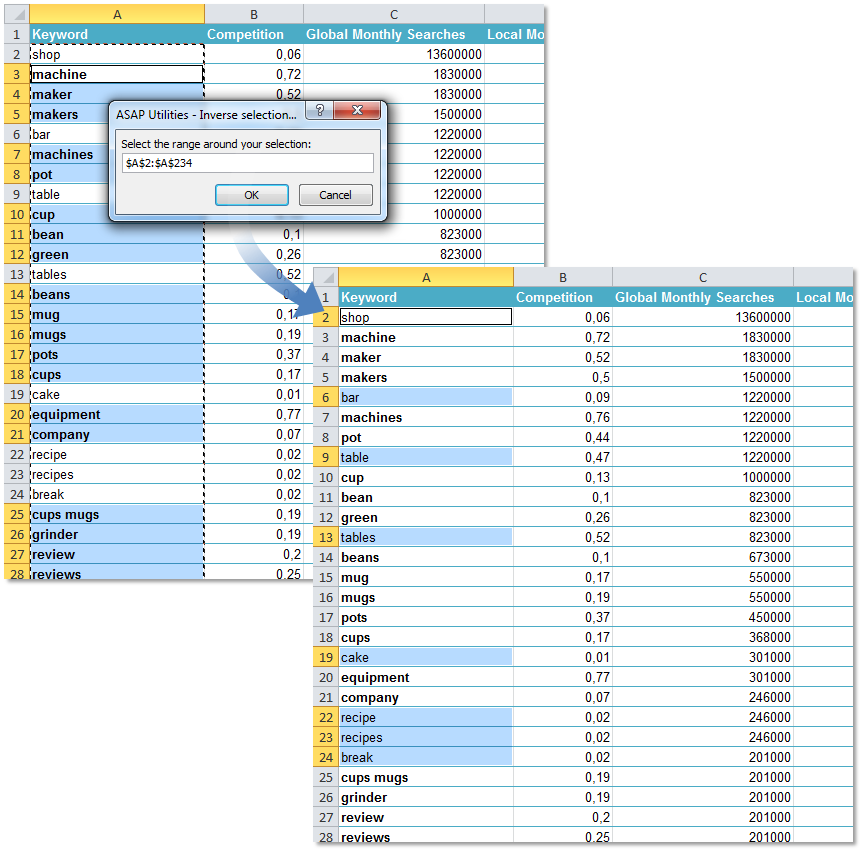
This tool inverts your cell selection within a specified range.
First, choose the range in which you want to invert your selection. The tool then swaps your selection. Cells that were selected become deselected and vice versa.
In effect, you end up with a new selection that includes only the cells not selected initially.
This is very useful when you want to work with almost the entire range except for a few cells. It saves you time and effort compared to manual deselection.
Starting this tool
Click › Select › 5. Invert Range Selection...
Specify a Keyboard Shortcut: ASAP Utilities › My Tools & Shortcuts › Manage My Tools & Shortcuts...
Additional keywords to help you find this tool:
Swap, deselecting, unselect
Tip:Alt+P for the previous tool.
Tip: Alt+N for the next tool.

Save Time in Excel. The Easy Way.
ASAP Utilities helps you save time and do what Excel alone can't.
You can get started right away. No training needed.
Most users start with a few tools. Many end up using ASAP Utilities daily.
Used by teams in 28,500+ organizations.
Get Started with ASAP Utilities
Start saving time in Excel with practical tools you can use right away.
-
No sign-up required.
-
-
Free 90-day trial