


Flip Selected Cells
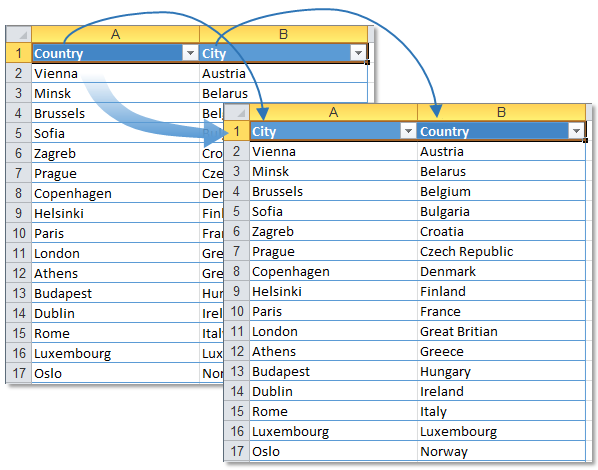
This tool flips the cells in your selection and works on cells in a single row or column.
For example, if you select four cells in a row (A1:D1) containing the values "Project Alpha," "Project Beta," "Project Gamma," and "Project Delta," the tool will flip them so that the order becomes "Project Delta," "Project Gamma," "Project Beta," and "Project Alpha".
Note:
If you need to reverse the order of an entire dataset, consider using our Advanced Sorting tool, which offers a sort in reverse order option.
Starting this tool
Click › Range › 5. Flip Selected Cells
Specify a Keyboard Shortcut: ASAP Utilities › My Tools & Shortcuts › Manage My Tools & Shortcuts...
Additional keywords to help you find this tool:
Swap cell order, Reverse cell order, Invert cell order in Excel, Reverse cells in selection, Reverse order of cells, Invert data order, Reverse cell contents, Mirror cells
Tip:Alt+P for the previous tool.
Tip: Alt+N for the next tool.

Save Time in Excel. The Easy Way.
ASAP Utilities helps you save time and do what Excel alone can't.
You can get started right away. No training needed.
Most users start with a few tools. Many end up using ASAP Utilities daily.
Used by teams in 28,500+ organizations.
Get Started with ASAP Utilities
Start saving time in Excel with practical tools you can use right away.
-
No sign-up required.
-
-
Free 90-day trial