


Insert Leading Apostrophe to Store Numbers as Text
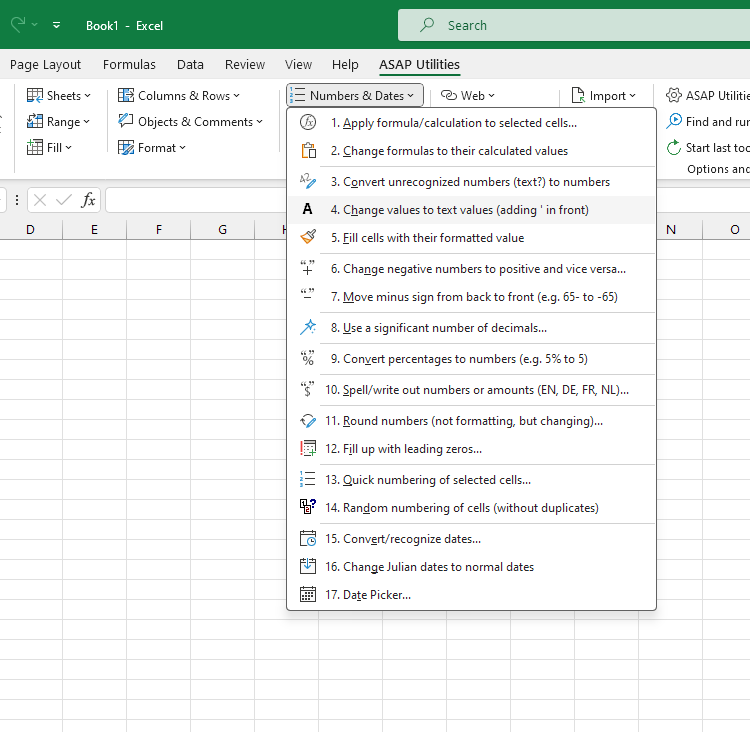
This tool inserts a leading apostrophe (') in front of each number in your selected cells so that Excel stores and treats them as text values.
It helps ensure consistency in your data and standardize data formats when working with mixed data types, such as a column with product codes that have both numbers and text values.
Cells containing formulas that yield numeric results are replaced with their static values, which are stored as text. Cells that contain text or dates are not affected.
Starting this tool
Specify a Keyboard Shortcut: ASAP Utilities › My Tools & Shortcuts › Manage My Tools & Shortcuts...
Additional keywords to help you find this tool:
Convert numbers to text, Store numbers as text, Add apostrophe to numbers, Insert apostrophe in front of number, Treat number as text, Textnumbers, Convert numeric values to text, Format number as text with apostrophe, Apostrophe before number, Convert cell to text with apostrophe, Store product codes as text in Excel
Tip:Alt+P for the previous tool.
Tip: Alt+N for the next tool.

Save Time in Excel. The Easy Way.
ASAP Utilities helps you save time and do what Excel alone can't.
You can get started right away. No training needed.
Most users start with a few tools. Many end up using ASAP Utilities daily.
Used by teams in 28,500+ organizations.
Get Started with ASAP Utilities
Start saving time in Excel with practical tools you can use right away.
-
No sign-up required.
-
-
Free 90-day trial