


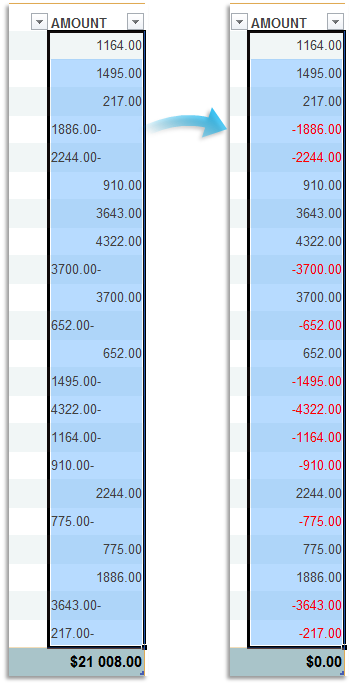
Fix Trailing Minus Sign: e.g., Convert 50- to -50
This tool fixes numbers with the minus sign at the end and moves it to the front so Excel recognizes them as negative numbers.
For example, it converts "250-" into "-250", making the value usable in calculations and formulas.
This is particularly useful when handling imported data from accounting or financial systems that format negative numbers with a minus sign at the end.
This tool is a quicker and easier alternative to using Excel's "Text to Columns" feature with the "Trailing minus for negative numbers" option under advanced settings.
Starting this tool
Specify a Keyboard Shortcut: ASAP Utilities › My Tools & Shortcuts › Manage My Tools & Shortcuts...
Additional keywords to help you find this tool:
Negative number at end, Fix numbers with minus sign at the end, Minus sign in wrong place, Trailing negative number fix, Reverse trailing minus, Numbers not recognized as negative, Import minus sign issue, Move minus from end to front, Negative values with trailing minus, Fix imported negative numbers, Accounting import minus sign problem, Convert trailing minus numbers to negative, Trailing minus Excel calculation issue, Excel not recognizing 100- as negative, Fix financial data with trailing minus
Tip:Alt+P for the previous tool.
Tip: Alt+N for the next tool.

Save Time in Excel. The Easy Way.
ASAP Utilities helps you save time and do what Excel alone can't.
You can get started right away. No training needed.
Most users start with a few tools. Many end up using ASAP Utilities daily.
Used by teams in 28,500+ organizations.
Get Started with ASAP Utilities
Start saving time in Excel with practical tools you can use right away.
-
No sign-up required.
-
-
Free 90-day trial