


Spell Numbers or Amounts in Words...
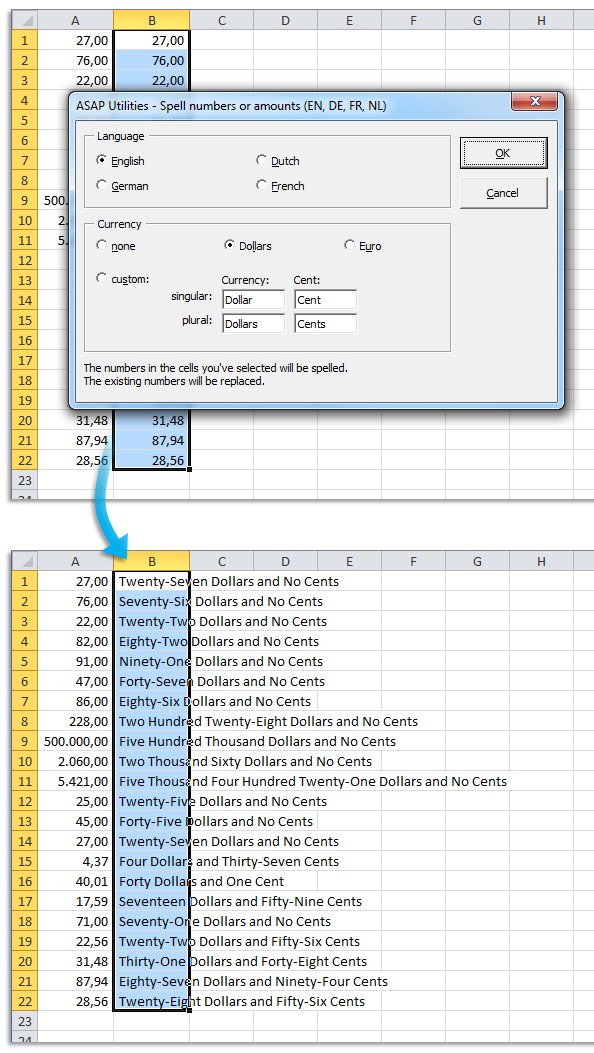
This tool spells out the numbers in your selected cells and replaces them with their written equivalents in words.
For example, the number "12.75" in English with the currency set to Dollars becomes Twelve Dollars and Seventy Five Cents.
You can choose to spell numbers as:
- Plain numbers (without currency)
- Amounts, for example to write on a check.
Available languages:
- English
- Dutch
- French
- German
- Italian
- Portuguese
- Portuguese (Brazil)
- Spanish
Currency options: None, Dollars, Euro, or a custom currency of your choice.
A number containing more than two decimal places is rounded to two decimals before being spelled out.
Starting this tool
Specify a Keyboard Shortcut: ASAP Utilities › My Tools & Shortcuts › Manage My Tools & Shortcuts...
Additional keywords to help you find this tool:
Convert number to words in Excel, Write numbers as words, Spell numbers in words, Convert numbers to check amounts, Number to text in words, Change numbers to words, Spell out currency amounts, Convert numeric value to text, Convert numbers to written text, Write out amounts on a check in Excel
Tip:Alt+P for the previous tool.
Tip: Alt+N for the next tool.

Save Time in Excel. The Easy Way.
ASAP Utilities helps you save time and do what Excel alone can't.
You can get started right away. No training needed.
Most users start with a few tools. Many end up using ASAP Utilities daily.
Used by teams in 28,500+ organizations.
Get Started with ASAP Utilities
Start saving time in Excel with practical tools you can use right away.
-
No sign-up required.
-
-
Free 90-day trial