


Permanently Round Numbers Without Using Formulas...
This tool rounds the actual numbers in your selected cells and replaces them with the rounded values.
Unlike cell formatting, which only changes how numbers look, this tool changes the actual values.
You can specify how it should round the numbers, similar to Excel's =ROUND() function:
- A positive number rounds to that number of decimal places.
- Zero rounds to the nearest whole number.
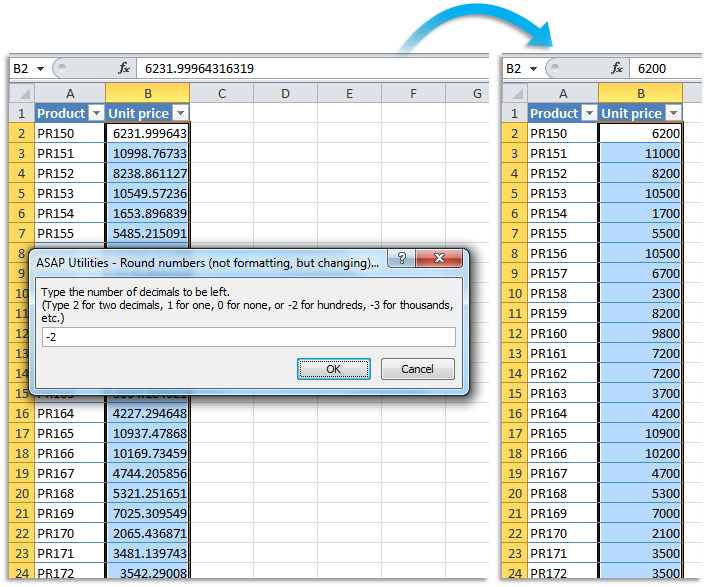
- A negative number rounds to the left of the decimal (e.g., to tens, hundreds, thousands).
For example, the value 1234.567:
- Rounded to 2 becomes 1234.57
- Rounded to 0 becomes 1235
- Rounded to -2 becomes 1200
This is helpful when you want to round values permanently for reports, exports, or data consistency, without using formulas.
Starting this tool
Specify a Keyboard Shortcut: ASAP Utilities › My Tools & Shortcuts › Manage My Tools & Shortcuts...
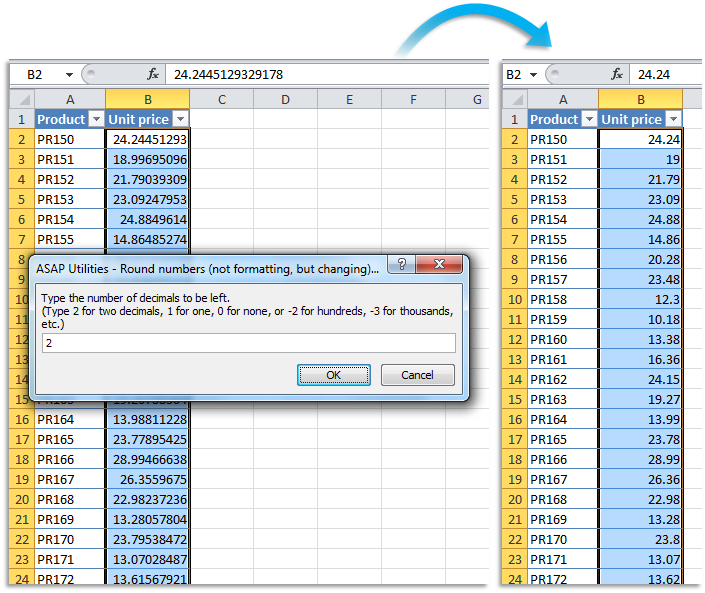
Example screenshot: B Round the selected numbers to the nearest integer (zero decimal places) (Here's the English version.)
.png "B Round the selected numbers to the nearest integer (zero decimal places) (Here's the English version.)")
Example screenshot: C Round the selected numbers to the nearest multiple of 100 (Here's the English version.)
Additional keywords to help you find this tool:
Round numbers in Excel without formula, Permanently round numbers, Round numbers and replace values, Round numbers without changing format, Round cell values without using formulas, Replace values with rounded numbers, Round decimals permanently, Round numbers to nearest 10 or 100 in Excel, Limit number of decimals in Excel without formatting
Tip:Alt+P for the previous tool.
Tip: Alt+N for the next tool.

Save Time in Excel. The Easy Way.
ASAP Utilities helps you save time and do what Excel alone can't.
You can get started right away. No training needed.
Most users start with a few tools. Many end up using ASAP Utilities daily.
Used by teams in 28,500+ organizations.
Get Started with ASAP Utilities
Start saving time in Excel with practical tools you can use right away.
-
No sign-up required.
-
-
Free 90-day trial