


Add Text to Beginning and/or End of Selected Cells...
This tool lets you quickly add text to the beginning, end, or both sides of the content in each selected cell.
It's ideal for adding prefixes, suffixes, labels, or wrapping values with characters such as quotes or parentheses. You can also use it to build formulas around the existing cell contents.
You can choose to:
- Add a value at the beginning of each cell (prefix)
- Add a value at the end of each cell (suffix)
- Use the cell's value, formula, or displayed (formatted) value
- Include or skip hidden cells
- Include or skip empty cells
An example preview shows how the result will look.
The "Reset" button clears the prefix and suffix input fields and restores the other options to their default values.
The tool remembers the last 100 values you used to insert before or after, so you can quickly reuse them.
Starting this tool
Specify a Keyboard Shortcut: ASAP Utilities › My Tools & Shortcuts › Manage My Tools & Shortcuts...
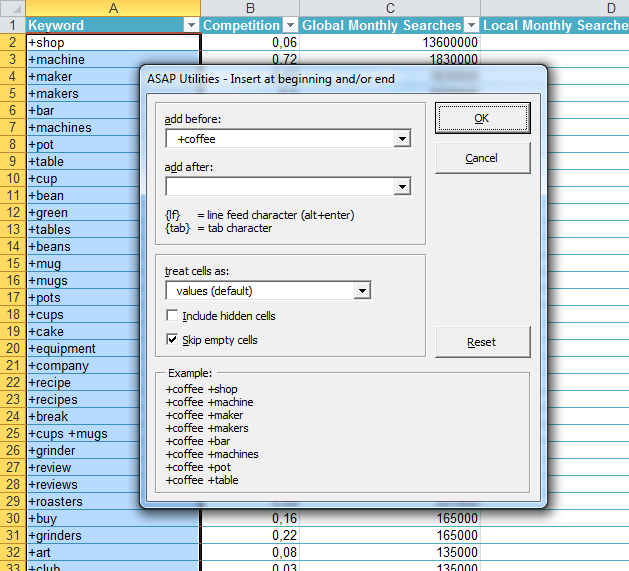
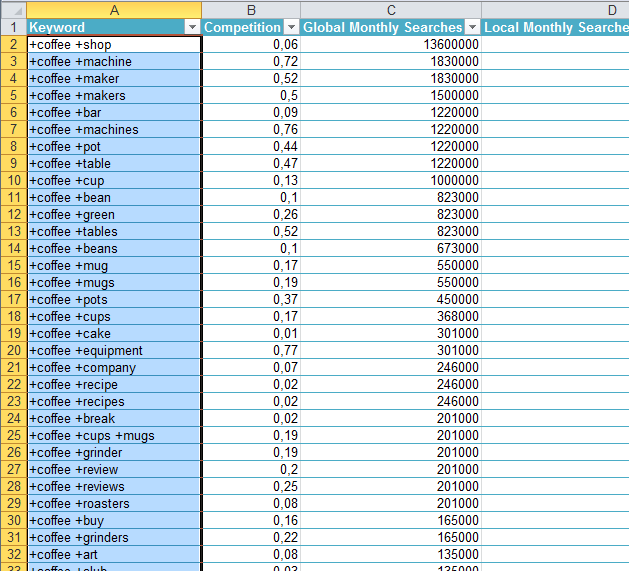
Example screenshot: 2 (Here's the English version.)
Additional keywords to help you find this tool:
Add text before and after cell values in Excel, Add prefix or suffix to multiple cells, Insert text at beginning or end of cells, Prepend or append text to cells, Add same text to all selected cells, Concatenate text to start or end of cell content, Bulk add prefix or suffix, Add label or tag to cell values, Insert characters around cell contents, Wrap values with quotes or parentheses, Add quotes around text in cells, Wrap Excel values with parentheses or characters, Build formulas around existing cell values, Prepare Excel data for JSON or API, Excel concatenate values with static text, Insert symbols before and after values, Surround values with special characters, Generate dynamic formulas with text and values, Combine text with existing cell content
Tip:Alt+P for the previous tool.
Tip: Alt+N for the next tool.

Save Time in Excel. The Easy Way.
ASAP Utilities helps you save time and do what Excel alone can't.
You can get started right away. No training needed.
Most users start with a few tools. Many end up using ASAP Utilities daily.
Used by teams in 28,500+ organizations.
Get Started with ASAP Utilities
Start saving time in Excel with practical tools you can use right away.
-
No sign-up required.
-
-
Free 90-day trial