


Convert Text Dates to Usable Excel Dates...
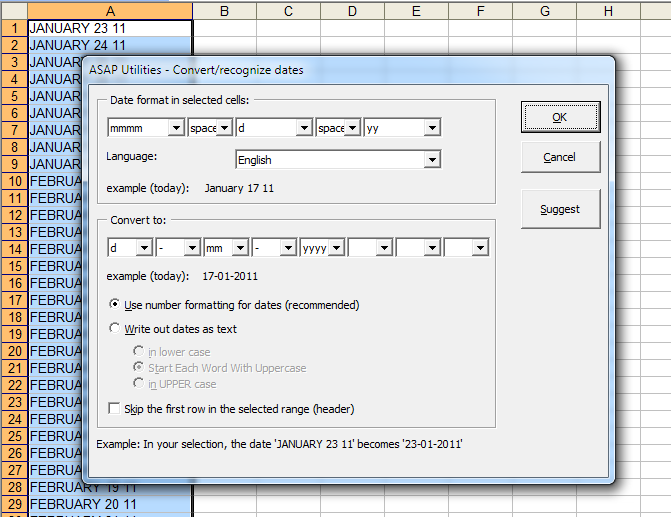
This tool converts text-based date values in your selected cells into usable Excel dates that you can work with in formulas, sorting, or formatting.
Sometimes, Excel does not recognize dates because they are stored as plain text.
These values are often left-aligned, cannot be formatted as dates, do not sort correctly, and will not work in calculations or with Excel date functions such as DATE, TEXT, DATEVALUE, YEAR, MONTH, DAY, EDATE, or DATEDIF.
This might happen when data is imported or copied from other programs or due to differences in regional settings, such as the order of day, month, and year, different date separators (like slashes, dots, or hyphens), or months written out in another language.
This tool helps you fix those issues by detecting the structure of each text date (for example, "JANUARY 23 24") and converting it into an actual Excel date (such as "23-01-2024").
You can:
- Select the format your current text dates follow
- Choose how to convert and format the recognized dates (for example, "23-01-2024" or "01/23/2024")
- Apply Excel's date formatting or convert them to text in lowercase, uppercase, or title case
- Skip the first row if it contains headers
Your last used settings are remembered automatically.
Note:
The tool works best when all values follow a consistent date structure.
Starting this tool
Specify a Keyboard Shortcut: ASAP Utilities › My Tools & Shortcuts › Manage My Tools & Shortcuts...
Additional keywords to help you find this tool:
Convert text to date in Excel, Convert text date to real date, Text not recognized as date, Fix unrecognized dates in Excel, DATEVALUE not working, Convert string to date, Change date format from US to EU, Excel dates stored as text, DATE function error, Use DATEDIF with text dates, Convert imported text to date, Recognize date format, TEXT function and date issues, Excel date functions not working, Regional date format problem, Fix date import errors, Convert text to usable date for formulas
Tip:Alt+P for the previous tool.
Tip: Alt+N for the next tool.

Save Time in Excel. The Easy Way.
ASAP Utilities helps you save time and do what Excel alone can't.
You can get started right away. No training needed.
Most users start with a few tools. Many end up using ASAP Utilities daily.
Used by teams in 28,500+ organizations.
Get Started with ASAP Utilities
Start saving time in Excel with practical tools you can use right away.
-
No sign-up required.
-
-
Free 90-day trial