


Remove Leading, Trailing, and Extra Spaces Between Words
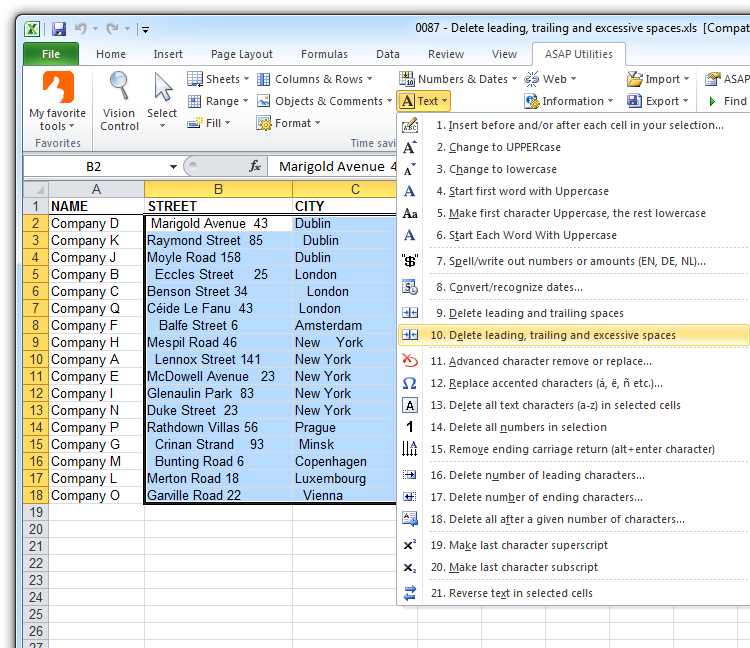
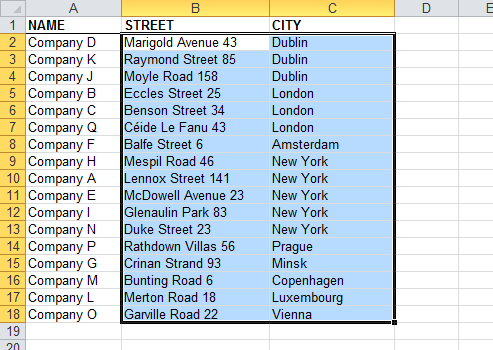
This tool removes unnecessary spaces from your selected cells by trimming the beginning and end of each value and reducing multiple spaces between words to a single space.
For example:
- "Lennox Street 141 " becomes "Lennox Street 141"
- " John A. Smith " becomes "John A. Smith"
- " email@example.com " becomes "email@example.com"
- " Multiple spaces in between " becomes "Multiple spaces in between"
It works like Excel's TRIM() function but with enhancements.
Unlike TRIM(), this tool also removes leading and trailing nonbreaking spaces (character 160), which sometimes appear in data copied from websites or exported from other systems. These spaces are visually identical to regular spaces but are not removed by Excel's TRIM. In web content, they often show up as the HTML entity.
As an added bonus, this tool also helps fix cells that contain a zero-length string. Microsoft uses this term for values that look blank but actually contain invisible content, such as a single apostrophe or the result of a formula like "" that was pasted into the cell as a value. After cleanup, Excel will recognize these cells as truly empty.
Cells that contain only spaces (including nonbreaking spaces) will be turned into empty cells.
Cells with formulas are left unchanged.
This is especially useful when cleaning up imported or pasted data, fixing lookup errors (e.g., VLOOKUP, XLOOKUP), or preparing clean, consistent text for reports, sorting, and filtering.
Starting this tool
Specify a Keyboard Shortcut: ASAP Utilities › My Tools & Shortcuts › Manage My Tools & Shortcuts...
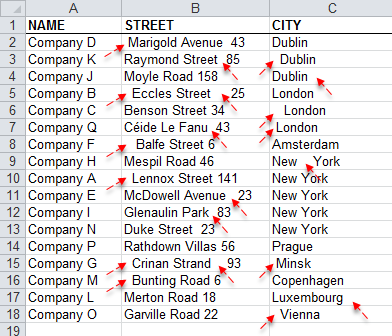
Example screenshot: 2 Strip the leading, trailing and duplicated spaces (Here's the English version.)
Example screenshot: 3 After (Here's the English version.)
Additional keywords to help you find this tool:
Remove extra spaces in Excel cells, Trim leading and trailing spaces, Clean up multiple spaces between words, Remove double spaces, Fix spacing issues in text, Remove unwanted whitespace, TRIM alternative, Delete extra spaces between words, Remove nonbreaking spaces, Clean messy text formatting, Convert dirty data to clean text, Trim not working, Excel won't recognize empty cells, Clean data for lookup formulas, Clean up Excel cells with extra spaces, Remove invisible spaces from cells, Excel remove char 160, Fix blank cell errors, Standardize spacing in Excel strings, Remove all but one space between words Excel
Tip:Alt+P for the previous tool.
Tip: Alt+N for the next tool.

Save Time in Excel. The Easy Way.
ASAP Utilities helps you save time and do what Excel alone can't.
You can get started right away. No training needed.
Most users start with a few tools. Many end up using ASAP Utilities daily.
Used by teams in 28,500+ organizations.
Get Started with ASAP Utilities
Start saving time in Excel with practical tools you can use right away.
-
No sign-up required.
-
-
Free 90-day trial